<?xml version="1.0" encoding="utf-8"?><feed xmlns="http://www.w3.org/2005/Atom" ><generator uri="https://jekyllrb.com/" version="4.4.1">Jekyll</generator><link href="https://blog.networg.com/feed/index.xml" rel="self" type="application/atom+xml" /><link href="https://blog.networg.com/" rel="alternate" type="text/html" /><updated>2026-05-15T08:57:11+00:00</updated><id>https://blog.networg.com/feed/index.xml</id><title type="html">NETWORG | Blog</title><subtitle>Read our experiences while we help others</subtitle><author><name>{&quot;avatar&quot; =&gt; &quot;/assets/images/networg.png&quot;, &quot;bio&quot; =&gt; &quot;Read our experiences while we help others&quot;, &quot;links&quot; =&gt; [{&quot;label&quot; =&gt; &quot;Company&quot;, &quot;icon&quot; =&gt; &quot;fas fa-fw fa-link&quot;, &quot;url&quot; =&gt; &quot;https://networg.com&quot;}, {&quot;label&quot; =&gt; &quot;Facebook&quot;, &quot;icon&quot; =&gt; &quot;fab fa-fw fa-facebook&quot;, &quot;url&quot; =&gt; &quot;https://fb.me/thenetworg&quot;}, {&quot;label&quot; =&gt; &quot;Twitter&quot;, &quot;icon&quot; =&gt; &quot;fab fa-fw fa-twitter-square&quot;, &quot;url&quot; =&gt; &quot;https://twitter.com/thenetworg&quot;}, {&quot;label&quot; =&gt; &quot;GitHub&quot;, &quot;icon&quot; =&gt; &quot;fab fa-fw fa-github&quot;, &quot;url&quot; =&gt; &quot;https://github.com/networg&quot;}, {&quot;label&quot; =&gt; &quot;Instagram&quot;, &quot;icon&quot; =&gt; &quot;fab fa-fw fa-instagram&quot;, &quot;url&quot; =&gt; &quot;https://instagram.com/thenetworg&quot;}, {&quot;label&quot; =&gt; &quot;LinkedIn&quot;, &quot;icon&quot; =&gt; &quot;fab fa-fw fa-linkedin&quot;, &quot;url&quot; =&gt; &quot;https://www.linkedin.com/company/networg/&quot;}]}</name></author><entry><title type="html">Dataverse solution component types</title><link href="https://blog.networg.com/dataverse-solution-component-types/" rel="alternate" type="text/html" title="Dataverse solution component types" /><published>2026-04-20T00:00:00+00:00</published><updated>2026-04-20T00:00:00+00:00</updated><id>https://blog.networg.com/dataverse-solution-component-types</id><content type="html" xml:base="https://blog.networg.com/dataverse-solution-component-types/"><![CDATA[<blockquote>
  <p>This is Part 1 of a 3-part series on Dataverse solution deployments:</p>
  <ol>
    <li><strong>Dataverse solution component types</strong> (you are here)</li>
    <li><a href="/making-solution-imports-fast/">Making Dataverse solution imports fast</a></li>
    <li><a href="/package-deployer-solutions-data-migrations/">Package Deployer for solutions, data, and migrations</a></li>
  </ol>
</blockquote>

<p>The docs explain solutions as “containers for customizations.” That is correct but not useful when you need to understand why some imports are fast and others are painfully slow. Or why some components show clean diffs in source control and others are opaque blobs.</p>

<p>This post covers the two distinct component architectures inside Dataverse. They import differently, diff differently, and have different tradeoffs. Understanding the difference helps you make better decisions about ALM tooling and troubleshooting.</p>

<h2 id="what-is-in-a-solution-zip">What is in a solution ZIP</h2>

<p>A managed solution is a ZIP file. The most important files inside:</p>

<ul>
  <li><strong><code class="language-plaintext highlighter-rouge">solution.xml</code></strong> - the manifest. Lists <code class="language-plaintext highlighter-rouge">RootComponents</code> with their type codes and schema names. Contains solution metadata like version, publisher, and dependencies.</li>
  <li><strong><code class="language-plaintext highlighter-rouge">customizations.xml</code></strong> - the definitions. This is where platform component definitions live. Entities, attributes, relationships, forms, views, sitemap fragments, ribbons, all packed into one XML file.</li>
  <li><strong>Individual payload files</strong> - some components (plugins, web resources, SCF components) have separate files referenced from the manifest.</li>
</ul>

<p>When you unpack a solution with <a href="https://learn.microsoft.com/en-us/power-platform/alm/solution-packager-tool">Solution Packager</a>, it splits <code class="language-plaintext highlighter-rouge">customizations.xml</code> into individual files organized by component type. Each entity gets a folder. Each form gets a file. This is what ends up in source control.</p>

<h2 id="managed-vs-unmanaged">Managed vs unmanaged</h2>

<blockquote>
  <p><strong>Important:</strong> Unmanaged solutions are only supposed to be used for export to source control and hydrating developer environments. This post doesn’t consider deploying unmanaged solutions beyond developer environments as a valid option.</p>
</blockquote>

<p>Dataverse uses a <strong>layering system</strong> for solution components. Every component exists in one or more layers.</p>

<ul>
  <li>The <strong>System layer</strong> is at the bottom. It contains out-of-box definitions shipped by Microsoft.</li>
  <li><strong>Managed layers</strong> stack above the system layer in installation order. Each managed solution gets its own layer.</li>
  <li>The <strong>Active (unmanaged) layer</strong> sits on top. This is where maker customizations go when someone edits a component directly in the environment.</li>
</ul>

<p>All unmanaged solutions in the same environment share that one Active layer. Working in Solution A versus Solution B does not isolate makers from each other. Preferred solution changes where new components are added, not which unmanaged layer they land in.</p>

<p>When Dataverse needs to compute the current state of a component, it resolves layers top-down. For most component types, the top layer simply wins. <strong>Forms, site maps, and model-driven apps</strong> are the notable merge cases. If a managed layer removes a property, the value from the layer below can surface again.</p>

<p>This is why <code class="language-plaintext highlighter-rouge">OverwriteUnmanagedCustomizations</code> matters for import performance. When set to <code class="language-plaintext highlighter-rouge">true</code>, the import overwrites the active layer, which forces Dataverse to reprocess every component. When <code class="language-plaintext highlighter-rouge">false</code>, SmartDiff can skip unchanged components entirely. More on that in <a href="/making-solution-imports-fast/">Part 2</a>.</p>

<h3 id="layers-versus-built-in-solutions">Layers versus built-in solutions</h3>

<p>One thing that confuses almost everyone at first is that Dataverse mixes <strong>layer concepts</strong> and <strong>solution containers</strong>.</p>

<ul>
  <li><strong>System</strong> is the base platform layer.</li>
  <li><strong>Active</strong> is the top unmanaged layer.</li>
  <li><strong>Default Solution</strong> is the special built-in solution that exposes all components in the environment.</li>
  <li><strong>Common Data Service Default Solution</strong> is the built-in maker default where new components land unless you choose another unmanaged solution.</li>
</ul>

<p>Those are not interchangeable ideas. <strong>System</strong> and <strong>Active</strong> describe how Dataverse computes runtime behavior. <strong>Default Solution</strong> and <strong>Common Data Service Default Solution</strong> describe where components are surfaced or created.</p>

<p>This is also where <strong>Preferred solution</strong> fits in. Preferred solution is a per-maker routing setting. If you set it, newly created solution-aware components are added to that unmanaged solution instead of the Common Data Service Default Solution. If you do not set it, Dataverse uses the Common Data Service Default Solution by default.</p>

<p>There is also a hidden <strong>Basic</strong> solution. It is not part of the public maker model and it is not a place to author customizations. One of the reasons for it is <strong>Block unmanaged customizations</strong>. That feature is supposed to stop ordinary unmanaged maker edits in production environments. But the platform and some features still need ways to create certain components in runtime without treating them like ad hoc customizations in the Active layer.</p>

<h3 id="built-in-dataverse-solutions-and-guids">Built-in Dataverse solutions and GUIDs</h3>

<table>
  <thead>
    <tr>
      <th>Solution</th>
      <th>GUID</th>
      <th>Notes</th>
    </tr>
  </thead>
  <tbody>
    <tr>
      <td><strong>System</strong></td>
      <td><code class="language-plaintext highlighter-rouge">FD140AAD-4DF4-11DD-BD17-0019B9312238</code></td>
      <td>Base platform layer</td>
    </tr>
    <tr>
      <td><strong>Active</strong></td>
      <td><code class="language-plaintext highlighter-rouge">FD140AAE-4DF4-11DD-BD17-0019B9312238</code></td>
      <td>Active layer - top unmanaged layer</td>
    </tr>
    <tr>
      <td><strong>Default Solution</strong></td>
      <td><code class="language-plaintext highlighter-rouge">FD140AAF-4DF4-11DD-BD17-0019B9312238</code></td>
      <td>View to all components</td>
    </tr>
    <tr>
      <td><strong>Common Data Service Default Solution</strong></td>
      <td><code class="language-plaintext highlighter-rouge">00000001-0000-0000-0001-00000000009B</code></td>
      <td>Built-in maker default</td>
    </tr>
    <tr>
      <td><strong>Basic</strong></td>
      <td><code class="language-plaintext highlighter-rouge">25A01723-9F63-4449-A3E0-046CC23A2902</code></td>
      <td>Hidden internal solution</td>
    </tr>
  </tbody>
</table>

<p>If you want to inspect them directly, query the <code class="language-plaintext highlighter-rouge">solution</code> table and filter by <code class="language-plaintext highlighter-rouge">solutionid</code>, <code class="language-plaintext highlighter-rouge">uniquename</code>, <code class="language-plaintext highlighter-rouge">friendlyname</code>, <code class="language-plaintext highlighter-rouge">isvisible</code>, and <code class="language-plaintext highlighter-rouge">ismanaged</code>.</p>

<h3 id="what-managed-means-for-ownership">What “managed” means for ownership</h3>

<p>A managed component is owned by its solution publisher. Makers in the target environment can customize it (adding an active layer on top) but cannot delete it. Only uninstalling or upgrading the managed solution can remove managed components.</p>

<p>This is the mechanism that enables safe component removal during upgrades. The <a href="/making-solution-imports-fast/#why-single-step-is-different">single-step upgrade</a> (<code class="language-plaintext highlighter-rouge">StageAndUpgradeRequest</code>) compares the incoming solution against the installed version and deletes components that are no longer present.</p>

<h3 id="managed-properties">Managed properties</h3>

<p>Managed ownership is only half the story. <strong>Managed properties</strong> are the switches the original publisher sets to control how much downstream customization is allowed. They are configured while the component is still unmanaged in development, then enforced after the managed solution is installed elsewhere.</p>

<p>That matters because “managed” does not automatically mean “locked down.” A table can be managed but still allow new forms, new views, or label changes. Or it can be tightly restricted. If a downstream team says “we can’t change this managed component,” the next question is whether the publisher disabled that through managed properties.</p>

<h3 id="publisher-strategy-pick-one-early">Publisher strategy: pick one early</h3>

<p>Use <strong>one publisher across related solutions</strong> unless you have a strong reason to split ownership. The publisher owns managed components, and that ownership association is not something you change later.</p>

<p>The prefix choice also sticks. Schema names, logical names, and choice value prefixes are created in the context of that publisher. If you later decide the component should really belong to a different publisher, you are usually looking at delete-and-recreate, plus data migration if the component stores data. Pick the publisher and prefix like you expect to live with them for years.</p>

<h2 id="platform-components">Platform components</h2>

<p>These are the original component types. They are implemented directly in the Dataverse codebase and identified by fixed, well-known type codes. The full list is published in the <a href="https://learn.microsoft.com/en-us/power-apps/developer/data-platform/reference/entities/solutioncomponent#BKMK_ComponentType">SolutionComponent entity reference</a>.</p>

<p>Examples: entities (type code 1), attributes (2), relationships (10), forms (60), views (26), plugins (90), web resources (61).</p>

<p>Type codes are static. They don’t change between environments.</p>

<p>Platform component definitions land in <code class="language-plaintext highlighter-rouge">customizations.xml</code> inside the solution ZIP. Solution Packager knows exactly how to decompose them into individual files because the schema is fixed and documented.</p>

<p>In source control, platform components are readable. You can diff a form XML and see which tabs or sections changed. You can review an entity definition and spot new attributes. Code review works.</p>

<h3 id="table-segmentation-keeps-layers-cleaner">Table segmentation keeps layers cleaner</h3>

<p>For existing tables, include <strong>only the assets you actually changed</strong>. If you changed one column and one form, ship that. Do not drag the whole table into every update unless the table is brand new in the target environment.</p>

<p>Smaller table payloads create fewer unnecessary layers, fewer accidental dependencies, and fewer chances to stomp on someone else’s top-wins component or form merge. It also helps import performance, which is one of the reasons <a href="/making-solution-imports-fast/">Part 2</a> keeps coming back to smaller, more focused updates.</p>

<h3 id="smartdiff-for-platform-components">SmartDiff for platform components</h3>

<p>SmartDiff coverage on the platform side expands over time as Microsoft enables it for additional component types. When your import processes fewer components than the total in the solution, SmartDiff is working. When it processes all of them, either everything legitimately changed, <code class="language-plaintext highlighter-rouge">OverwriteUnmanagedCustomizations</code> is <code class="language-plaintext highlighter-rouge">true</code>, or the component type isn’t covered by SmartDiff yet.</p>

<h2 id="scf-components">SCF components</h2>

<p>Solution Component Framework (SCF) is the newer architecture. Product teams at Microsoft use it to add new component types to Dataverse without changing the core platform code.</p>

<p>SCF components are registered via <code class="language-plaintext highlighter-rouge">solutioncomponentdefinition</code> metadata, brought to environments dynamically by Microsoft first-party solutions. Each product team decides what their component looks like in a solution export.</p>

<h3 id="how-scf-differs-from-platform-components">How SCF differs from platform components</h3>

<p><strong>Runtime-assigned type codes</strong> - SCF components use <code class="language-plaintext highlighter-rouge">objecttypecode</code> values typically above 1000. These codes are assigned at runtime and can differ between environments. Dataverse resolves SCF components by their unique component names on import, not by type code.</p>

<p><strong>No static schema</strong> - Each component owner decides the export format. Some use JSON. Some use XML. There is no single schema reference for validation.</p>

<p><strong>Lax import validation</strong> - SCF component types vary in how strictly they validate incoming payloads. Some accept values that only fail at runtime rather than at import time, so errors can surface later than you would expect.</p>

<p><strong>Worse readability in source control</strong> - SCF component files are typically files with non-descriptive name and unnecessary folder nesting. JSON payloads with GUIDs and encoded properties. Not friendly for code review or conflict resolution.</p>

<h3 id="smartdiff-for-scf-components">SmartDiff for SCF components</h3>

<p>SCF was designed with diff support built into the framework itself. SCF components get SmartDiff coverage automatically as new types are introduced. This is different from platform components where SmartDiff has to be enabled per type.</p>

<h3 id="discovering-scf-components">Discovering SCF components</h3>

<p>To see which SCF component types exist in a given environment:</p>

<div class="language-http highlighter-rouge"><div class="highlight"><pre class="highlight"><code><span class="err">GET ORG/api/data/v9.2/solutioncomponentdefinitions?$select=name,objecttypecode
</span></code></pre></div></div>

<p>The response shows you every registered component type with its runtime type code. Compare across environments to see why type codes might differ.</p>

<h2 id="deployment-methods">Deployment methods</h2>

<p>Today the platform supports multiple ways to deploy solutions:</p>

<ul>
  <li><strong>Maker UI</strong> - manual import through <code class="language-plaintext highlighter-rouge">make.powerapps.com</code></li>
  <li><strong><a href="https://learn.microsoft.com/en-us/power-platform/developer/cli/reference/solution#pac-solution-import">PAC CLI</a></strong> - <code class="language-plaintext highlighter-rouge">pac solution import</code> with various flags</li>
  <li><strong>Azure DevOps tasks and GitHub Actions</strong> - <a href="https://github.com/microsoft/powerplatform-cli-wrapper">wrappers over PAC CLI</a></li>
  <li><strong><a href="https://learn.microsoft.com/en-us/power-platform/alm/pipelines">Power Platform Pipelines</a></strong> - managed by the platform, abstracts import details server-side</li>
  <li><strong><a href="https://learn.microsoft.com/en-us/power-platform/alm/package-deployer-tool?tabs=cli">Package Deployer</a></strong> - multi-solution orchestration with custom code hooks. You run Package Deployer yourself (locally, in a pipeline, or via PowerShell).</li>
  <li><strong><a href="https://learn.microsoft.com/en-us/power-platform/developer/catalog/overview">Catalog</a></strong> - submit a Package Deployer package to the platform and let it handle execution. Installations go through the same internal service (TPS) that processes AppSource installs and first-party Microsoft updates, so your deployment is queued alongside platform servicing rather than competing with it. Useful when weekend servicing windows cause import conflicts. See <a href="/package-deployer-solutions-data-migrations/#catalog">Part 3</a> for details.</li>
  <li><strong>Native Git integration</strong> - component-level sync between a dev environment and an Azure DevOps repo. Bypasses the solution import pipeline entirely. See <a href="/making-solution-imports-fast/#how-does-native-git-integration-relate-to-this">Part 2</a>.</li>
</ul>

<p>All of these end up calling Dataverse APIs underneath (except native Git, which uses its own code path). The differences are in what parameters they pass, what defaults they use, and how much control you get.</p>

<p><a href="/making-solution-imports-fast/">Part 2</a> covers which import types exist and how to make them fast. <a href="/package-deployer-solutions-data-migrations/">Part 3</a> covers Package Deployer for teams that need orchestration, custom code, and data migrations.</p>]]></content><author><name>Tomas Prokop</name></author><category term="Microsoft" /><category term="Microsoft Power Platform" /><category term="Power Platform" /><category term="ALM" /><category term="Solution Framework" /><category term="Dataverse" /><summary type="html"><![CDATA[Two architectures for solution components live inside Dataverse. They import differently, diff differently, and show up differently in source control. This is Part 1 of a 3-part series.]]></summary></entry><entry><title type="html">Making Dataverse solution imports fast</title><link href="https://blog.networg.com/making-solution-imports-fast/" rel="alternate" type="text/html" title="Making Dataverse solution imports fast" /><published>2026-04-20T00:00:00+00:00</published><updated>2026-04-20T00:00:00+00:00</updated><id>https://blog.networg.com/making-solution-imports-fast</id><content type="html" xml:base="https://blog.networg.com/making-solution-imports-fast/"><![CDATA[<blockquote>
  <p>This is Part 2 of a 3-part series on Dataverse solution deployments:</p>
  <ol>
    <li><a href="/dataverse-solution-component-types/">Dataverse solution component types</a></li>
    <li><strong>Making Dataverse solution imports fast</strong> (you are here)</li>
    <li><a href="/package-deployer-solutions-data-migrations/">Package Deployer for solutions, data, and migrations</a></li>
  </ol>
</blockquote>

<p>If you search “slow solution import” and land here, you are in the right place. This post covers the four import types Dataverse supports, how SmartDiff skips unchanged components, real benchmark numbers comparing each method, and a troubleshooting checklist. <a href="/dataverse-solution-component-types/">Part 1</a> explains what is inside a solution. <a href="/package-deployer-solutions-data-migrations/">Part 3</a> covers Package Deployer for teams that need orchestration and custom code.</p>

<h2 id="tldr">TL;DR</h2>

<ul>
  <li>Use <strong>single-step upgrade</strong> (<code class="language-plaintext highlighter-rouge">StageAndUpgradeRequest</code> / <code class="language-plaintext highlighter-rouge">pac solution import --stage-and-upgrade</code>) for routine managed deployments. It’s atomic, supports SmartDiff, and rolls back cleanly on failure.</li>
  <li>Reserve <strong>two-step “Stage for upgrade”</strong> only when you need a migration window between old and new versions (e.g., data transforms via Package Deployer’s <code class="language-plaintext highlighter-rouge">RunSolutionUpgradeMigrationStep</code>). More on that in <a href="/package-deployer-solutions-data-migrations/">Part 3</a>.</li>
  <li><strong>SmartDiff</strong> accelerates Update and single-step Upgrade by skipping unchanged components, but it is disabled when <code class="language-plaintext highlighter-rouge">OverwriteUnmanagedCustomizations</code> is <code class="language-plaintext highlighter-rouge">true</code>. If unmanaged drift is the problem, use <strong><a href="https://learn.microsoft.com/en-us/power-platform/admin/prevent-unmanaged-customizations">Block unmanaged customizations</a></strong> instead of force-overwrite.</li>
  <li>Keep updates <strong>small and segmented</strong>. For existing tables, <a href="/dataverse-solution-component-types/#table-segmentation-keeps-layers-cleaner">include only the changed assets</a> rather than the whole table. Avoid <strong>Publish all customizations</strong> and <strong>convert-to-managed</strong> for managed deployments.</li>
  <li><strong>If imports feel slow, update your tooling first.</strong> Newer Dataverse API endpoints (<code class="language-plaintext highlighter-rouge">StageAndUpgrade</code>, <code class="language-plaintext highlighter-rouge">StageSolution</code>) unlock SmartDiff and single-step upgrades. Older tools may still use the legacy two-step path. Then check <code class="language-plaintext highlighter-rouge">msdyn_isoverwritecustomizations</code> in <code class="language-plaintext highlighter-rouge">msdyn_solutionhistory</code> to rule out SmartDiff being disabled.</li>
</ul>

<h2 id="which-import-method-should-i-use">Which import method should I use?</h2>

<table>
  <thead>
    <tr>
      <th>Scenario</th>
      <th>Method</th>
      <th>PAC CLI</th>
    </tr>
  </thead>
  <tbody>
    <tr>
      <td>First deployment (new solution)</td>
      <td>Install</td>
      <td><code class="language-plaintext highlighter-rouge">pac solution import</code></td>
    </tr>
    <tr>
      <td>Incremental update, no component removal needed</td>
      <td>Update</td>
      <td><code class="language-plaintext highlighter-rouge">pac solution import</code></td>
    </tr>
    <tr>
      <td>Standard managed deployment with component cleanup</td>
      <td><strong>Single-step upgrade</strong></td>
      <td><code class="language-plaintext highlighter-rouge">pac solution import --stage-and-upgrade</code></td>
    </tr>
    <tr>
      <td>Need migration window for data transforms</td>
      <td>Stage for upgrade + Apply</td>
      <td><code class="language-plaintext highlighter-rouge">--import-as-holding</code> then <code class="language-plaintext highlighter-rouge">pac solution upgrade</code></td>
    </tr>
    <tr>
      <td>Multi-solution orchestration with custom hooks</td>
      <td>Package Deployer</td>
      <td>see <a href="/package-deployer-solutions-data-migrations/">Part 3</a></td>
    </tr>
  </tbody>
</table>

<p>For most teams shipping managed solutions, <strong>single-step upgrade is the default choice</strong>. It deletes removed components, supports SmartDiff, and completes as one transaction. Fall back to the two-step path only when you need both the old and new versions installed concurrently.</p>

<h2 id="solution-import-types">Solution import types</h2>

<p>Each deployment client calls the Dataverse SOAP web service (legacy) or OData API. The main behaviors map to these request types:</p>

<table>
  <thead>
    <tr>
      <th>Import Type</th>
      <th>UI Label</th>
      <th>History Operations</th>
      <th>Import Context</th>
      <th>SDK Message</th>
      <th>SmartDiff</th>
      <th>PAC CLI</th>
      <th>Description</th>
    </tr>
  </thead>
  <tbody>
    <tr>
      <td>New</td>
      <td>—</td>
      <td>Import &amp; New</td>
      <td>ImportInstall</td>
      <td><code class="language-plaintext highlighter-rouge">ImportSolutionRequest</code></td>
      <td>No</td>
      <td><code class="language-plaintext highlighter-rouge">pac solution import</code></td>
      <td>First import of a solution not yet in the environment</td>
    </tr>
    <tr>
      <td>Update</td>
      <td>Update</td>
      <td>Import &amp; Update</td>
      <td>ImportUpgrade</td>
      <td><code class="language-plaintext highlighter-rouge">ImportSolutionRequest</code></td>
      <td>Yes</td>
      <td><code class="language-plaintext highlighter-rouge">pac solution import</code></td>
      <td>In-place update preserving unmanaged customizations. <strong>Faster but doesn’t delete removed components</strong></td>
    </tr>
    <tr>
      <td>Holding + Apply</td>
      <td>Stage for Upgrade</td>
      <td>Import &amp; Upgrade + Import &amp; Uninstall</td>
      <td>ImportHolding</td>
      <td><code class="language-plaintext highlighter-rouge">ImportSolutionRequest</code> (<code class="language-plaintext highlighter-rouge">HoldingSolution</code>=true) + <code class="language-plaintext highlighter-rouge">DeleteAndPromoteRequest</code></td>
      <td>No</td>
      <td><code class="language-plaintext highlighter-rouge">--import-as-holding</code> + <code class="language-plaintext highlighter-rouge">pac solution upgrade</code></td>
      <td>Two-step: holding import, then apply upgrade to remove old base + patches</td>
    </tr>
    <tr>
      <td>Single Step Upgrade</td>
      <td>Upgrade</td>
      <td>Import &amp; Single Step Upgrade</td>
      <td>ImportUpgrade</td>
      <td><code class="language-plaintext highlighter-rouge">StageAndUpgradeRequest</code></td>
      <td>Yes</td>
      <td><code class="language-plaintext highlighter-rouge">--stage-and-upgrade</code></td>
      <td>Atomic upgrade in one transaction (2024+)</td>
    </tr>
  </tbody>
</table>

<p>SmartDiff applies to Update and Single Step Upgrade only when <code class="language-plaintext highlighter-rouge">OverwriteUnmanagedCustomizations</code> is set to <code class="language-plaintext highlighter-rouge">false</code>.</p>

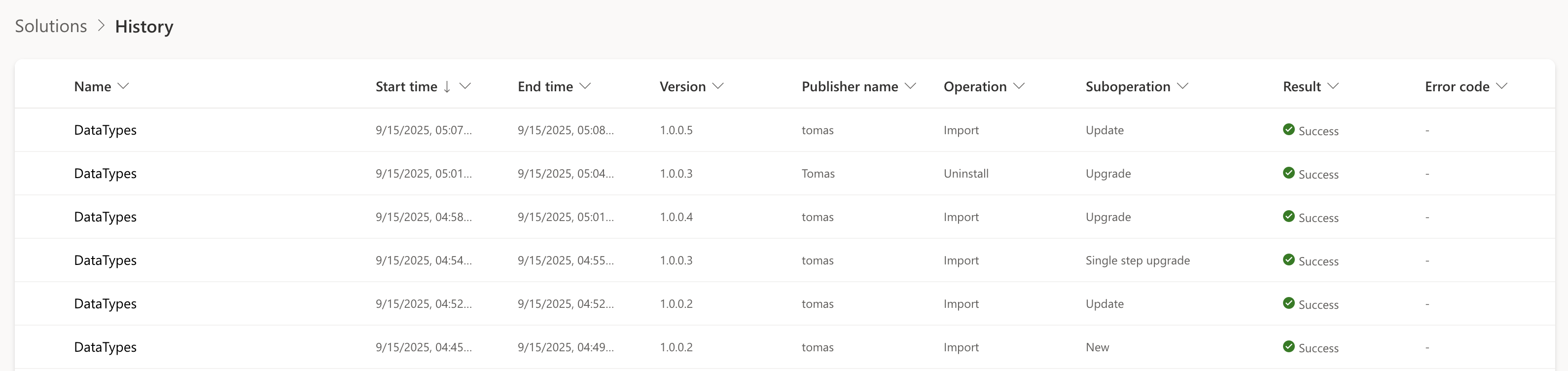
<p>The screenshot below shows the Solution Import History page in Power Apps Maker. Use the Operation and Suboperation columns to identify the type of import. Refer to the table above for interpretation.</p>

<p><img src="/uploads/2025/09/solution-import-history.png" alt="Solution import history page" /></p>

<h3 id="terminology-note">Terminology note</h3>

<p>The word “stage” is heavily overloaded in this space:</p>

<table>
  <thead>
    <tr>
      <th>Term</th>
      <th>Meaning</th>
      <th>Don’t confuse with</th>
    </tr>
  </thead>
  <tbody>
    <tr>
      <td><code class="language-plaintext highlighter-rouge">StageSolutionRequest</code></td>
      <td>Upload and validate a ZIP before import (no actual import)</td>
      <td>“Stage for upgrade”</td>
    </tr>
    <tr>
      <td>Stage for upgrade</td>
      <td>Import as holding solution + apply upgrade later (two-step)</td>
      <td><code class="language-plaintext highlighter-rouge">StageSolutionRequest</code></td>
    </tr>
    <tr>
      <td><code class="language-plaintext highlighter-rouge">StageAndUpgradeRequest</code></td>
      <td>Atomic single-step upgrade (2024+)</td>
      <td>“Stage for upgrade”</td>
    </tr>
    <tr>
      <td>Update</td>
      <td>In-place update, keeps removed components</td>
      <td>Upgrade</td>
    </tr>
    <tr>
      <td>Upgrade (Maker UI)</td>
      <td>Single-step upgrade since 2024</td>
      <td>The old “Stage for upgrade”</td>
    </tr>
  </tbody>
</table>

<h2 id="smartdiff">SmartDiff</h2>

<p>SmartDiff has been available since 2021 for the <strong>Update</strong> import type. In 2024, Microsoft extended it to <strong>single-step upgrades</strong> (<code class="language-plaintext highlighter-rouge">StageAndUpgradeRequest</code>). The SDK message itself shipped earlier (January 2021, org version <code class="language-plaintext highlighter-rouge">9.2.21013.00131</code>), but SmartDiff did not apply to that path until the 2024 rollout.</p>

<p><strong>How it works:</strong> When you import a solution, Dataverse stores a copy in blob storage. On the next import, it compares the incoming components against the stored version at the XML/metadata level. Components where nothing changed are skipped entirely. The platform generates a filtered import containing only the delta and processes that instead.</p>

<p>If you remember the now-deprecated <a href="https://learn.microsoft.com/en-us/power-platform/alm/create-patches-simplify-solution-updates">solution patches</a> (<code class="language-plaintext highlighter-rouge">CloneAsPatch</code>), SmartDiff achieves a similar goal, reducing the import to only changed components, but does so automatically without requiring you to manually create and manage patch solutions.</p>

<p>In practice, this can make updates and single-step upgrades dramatically faster when most components have not changed.</p>

<p>For classic platform components (entities, attributes, relationships, forms, views), SmartDiff is enabled individually per component type. The newer <a href="/dataverse-solution-component-types/#scf-components">SCF components</a>, those with type codes above 1000 registered via <code class="language-plaintext highlighter-rouge">solutioncomponentdefinition</code>, were designed with diff support built into the framework itself. SmartDiff coverage extends to them automatically as new SCF types are introduced.</p>

<blockquote>
  <p><strong>Important:</strong> Setting <code class="language-plaintext highlighter-rouge">OverwriteUnmanagedCustomizations</code> to <code class="language-plaintext highlighter-rouge">true</code> disables SmartDiff. The check happens before any comparison. If the flag is true, Dataverse skips the optimization and processes all components unconditionally. Force-overwrite significantly slows managed solution imports. If the real problem is unmanaged drift in nondevelopment environments, use <strong><a href="https://learn.microsoft.com/en-us/power-platform/admin/prevent-unmanaged-customizations">Block unmanaged customizations</a></strong> instead of leaving force-overwrite enabled.</p>
</blockquote>

<h2 id="two-step-upgrades-and-when-they-are-still-useful">Two-step upgrades and when they are still useful</h2>

<blockquote>
  <p><strong>Important:</strong> The two-step “Stage for upgrade” path is the slowest of all upgrade methods. It does not benefit from SmartDiff. The Maker UI uses synchronous <code class="language-plaintext highlighter-rouge">DeleteAndPromote</code> for the apply step, a blocking HTTP call with no progress feedback, though <code class="language-plaintext highlighter-rouge">DeleteAndPromoteAsync</code> is also available via the Web API for automation. Only use this path when you genuinely need the migration window, not for routine deployments.</p>
</blockquote>

<h3 id="how-it-works">How it works</h3>

<p>The Maker UI “Stage for upgrade” button calls <code class="language-plaintext highlighter-rouge">ImportSolutionAsync</code> with <code class="language-plaintext highlighter-rouge">HoldingSolution: true</code> (not <code class="language-plaintext highlighter-rouge">StageAndUpgradeAsync</code>). This imports a temporary <code class="language-plaintext highlighter-rouge">{SolutionName}_Upgrade</code> holding solution injected above the base solution layer and below any solution sitting above it. Because <code class="language-plaintext highlighter-rouge">importcontext = ImportHolding</code>, SmartDiff does not apply. All components are processed unconditionally.</p>

<p>Applying the upgrade fires <code class="language-plaintext highlighter-rouge">DeleteAndPromote</code>, which removes the old base layer and any pending patches, then renames the <code class="language-plaintext highlighter-rouge">_Upgrade</code> solution by stripping the suffix. Every component is touched twice across the two phases with no optimization.</p>

<h3 id="why-single-step-is-different">Why single-step is different</h3>

<p><code class="language-plaintext highlighter-rouge">StageAndUpgradeRequest</code> was designed differently. Instead of creating a separate layer and promoting it, it works like the Update path, modifying the existing solution layer in place and additionally deleting components no longer present in the new version. Because it shares the in-place update architecture, SmartDiff applies the same way it does to Update imports. No <code class="language-plaintext highlighter-rouge">_Upgrade</code> solution is created. If the operation fails, the transaction rolls back cleanly.</p>

<h3 id="when-to-use-two-step-anyway">When to use two-step anyway</h3>

<p>The two-step flow is the right choice when you need a controlled <strong>migration window</strong>. “Stage for upgrade” imports the new version but defers deletion of the previous version. Select this option when you need both old and new versions installed concurrently to run data migrations before completing the upgrade.</p>

<p>For example, you can stage the new version, run migrations or transform data (you can use Package Deployer’s <a href="https://learn.microsoft.com/en-us/dotnet/api/microsoft.xrm.tooling.packagedeployment.crmpackageextentionbase.iimportextensions.runsolutionupgrademigrationstep?view=dataverse-sdk-latest">RunSolutionUpgradeMigrationStep</a>), then apply the upgrade. <a href="/package-deployer-solutions-data-migrations/">Part 3</a> covers this in detail.</p>

<blockquote>
  <p><strong>Note:</strong> Package Deployer automatically detects whether your package has a meaningful implementation of <code class="language-plaintext highlighter-rouge">RunSolutionUpgradeMigrationStep</code>. If custom migration code is detected, PD switches to the two-step holding path and calls your migration code after the holding import completes but before <code class="language-plaintext highlighter-rouge">DeleteAndPromote</code> fires. You can confirm this from PD’s log output: <code class="language-plaintext highlighter-rouge">User Provided Upgrade code is not detected in package. if allowed, Package Deployer will use one step upgrade pattern for this package.</code></p>
</blockquote>

<h3 id="dependency-cleanup">Dependency cleanup</h3>

<p>The two-step path also helps with <strong>dependency cleanup across solution layers</strong>. When removing a component referenced by higher layers, you need to control the upgrade order so the upper layer drops the dependency first. <a href="/package-deployer-solutions-data-migrations/#cross-solution-dependency-cleanup">Part 3</a> covers the practical details.</p>

<h2 id="benchmark">Benchmark</h2>

<p>The following numbers are from a real managed solution with 79 components, measured on a single environment. Each version contained one changed component (a single column label edit) against the prior version, so the SmartDiff delta was consistent across runs.</p>

<table>
  <thead>
    <tr>
      <th>Version</th>
      <th>Method</th>
      <th>API action</th>
      <th><code class="language-plaintext highlighter-rouge">msdyn_suboperation</code></th>
      <th>Components processed</th>
      <th>Server time</th>
      <th>SmartDiff</th>
      <th><code class="language-plaintext highlighter-rouge">OverwriteUnmanagedCustomizations</code></th>
    </tr>
  </thead>
  <tbody>
    <tr>
      <td>1.0.0.1</td>
      <td>PP Pipelines (install)</td>
      <td><code class="language-plaintext highlighter-rouge">DeployPackageAsync</code> (opaque)</td>
      <td>1 = Install</td>
      <td>79 / 79</td>
      <td>404 s</td>
      <td>❌</td>
      <td><code class="language-plaintext highlighter-rouge">false</code></td>
    </tr>
    <tr>
      <td>1.0.0.2</td>
      <td>PP Pipelines (upgrade)</td>
      <td><code class="language-plaintext highlighter-rouge">DeployPackageAsync</code> (opaque)</td>
      <td>5 = Upgrade</td>
      <td>28 / 79</td>
      <td>120 s</td>
      <td>✅</td>
      <td><code class="language-plaintext highlighter-rouge">false</code></td>
    </tr>
    <tr>
      <td>1.0.0.3</td>
      <td>Maker UI - Upgrade</td>
      <td><code class="language-plaintext highlighter-rouge">StageAndUpgradeAsync</code></td>
      <td>5 = Upgrade</td>
      <td>28 / 79</td>
      <td>82 s</td>
      <td>✅</td>
      <td><code class="language-plaintext highlighter-rouge">false</code></td>
    </tr>
    <tr>
      <td>1.0.0.4</td>
      <td>Direct API - Upgrade</td>
      <td><code class="language-plaintext highlighter-rouge">StageAndUpgradeAsync</code></td>
      <td>5 = Upgrade</td>
      <td>28 / 79</td>
      <td>95 s</td>
      <td>✅</td>
      <td><code class="language-plaintext highlighter-rouge">false</code></td>
    </tr>
    <tr>
      <td>1.0.0.5</td>
      <td>Maker UI - Update</td>
      <td><code class="language-plaintext highlighter-rouge">ImportSolutionAsync</code></td>
      <td>3 = Update</td>
      <td>1 / 79 (7 entities)</td>
      <td><strong>15 s</strong></td>
      <td>✅</td>
      <td><code class="language-plaintext highlighter-rouge">false</code></td>
    </tr>
    <tr>
      <td>1.0.0.6</td>
      <td>Maker UI - Stage for upgrade + Apply</td>
      <td><code class="language-plaintext highlighter-rouge">ImportSolutionAsync (HoldingSolution=true)</code> + <code class="language-plaintext highlighter-rouge">DeleteAndPromote</code> (sync)</td>
      <td>2 = HoldingImport</td>
      <td>79 / 79</td>
      <td><strong>433 s + 193 s = 626 s</strong></td>
      <td>❌</td>
      <td><code class="language-plaintext highlighter-rouge">false</code></td>
    </tr>
    <tr>
      <td>1.0.0.7</td>
      <td>Direct API - Upgrade</td>
      <td><code class="language-plaintext highlighter-rouge">StageAndUpgradeAsync</code></td>
      <td>5 = Upgrade</td>
      <td><strong>79 / 79</strong></td>
      <td><strong>414 s</strong></td>
      <td>❌ (disabled)</td>
      <td><strong><code class="language-plaintext highlighter-rouge">true</code></strong></td>
    </tr>
    <tr>
      <td>1.0.0.8</td>
      <td>Package Deployer - Upgrade</td>
      <td><code class="language-plaintext highlighter-rouge">StageAndUpgradeAsync</code></td>
      <td>5 = Upgrade</td>
      <td>28 / 79</td>
      <td>93 s</td>
      <td>✅</td>
      <td><code class="language-plaintext highlighter-rouge">false</code></td>
    </tr>
  </tbody>
</table>

<h3 id="reading-the-results">Reading the results</h3>

<p>The <code class="language-plaintext highlighter-rouge">msdyn_suboperation</code> values map to: <strong>1</strong> = Install, <strong>2</strong> = HoldingImport / DeleteAndPromote, <strong>3</strong> = Update, <strong>5</strong> = Upgrade (atomic). Both Update (3) and Upgrade (5) produce <code class="language-plaintext highlighter-rouge">importcontext = ImportUpgrade</code> and benefit from SmartDiff. Install (1) and HoldingImport (2) do not.</p>

<p><strong>SmartDiff impact (v1.0.0.7, control experiment):</strong> Same solution, same change size, same API action as v1.0.0.4. The only difference is <code class="language-plaintext highlighter-rouge">OverwriteUnmanagedCustomizations=true</code>. SmartDiff was completely absent from the importjob XML and all 79 components were processed: 414 s vs 95 s. The flag forces unconditional processing of every component.</p>

<p><strong>Two-step penalty (v1.0.0.6):</strong> The holding import processed all 79 components with no SmartDiff (433 s), then <code class="language-plaintext highlighter-rouge">DeleteAndPromote</code> touched every component again (193 s). 626 s total, the slowest path. <code class="language-plaintext highlighter-rouge">DeleteAndPromote</code> was a synchronous blocking HTTP call with no progress feedback in the Maker UI. The API also exposes <a href="https://learn.microsoft.com/en-us/power-apps/developer/data-platform/webapi/reference/deleteandpromoteasync"><code class="language-plaintext highlighter-rouge">DeleteAndPromoteAsync</code></a> for automation scenarios.</p>

<p><strong>Package Deployer (v1.0.0.8):</strong> PD’s one-step upgrade path produced results identical to a direct <code class="language-plaintext highlighter-rouge">StageAndUpgradeAsync</code> call. 93 s, SmartDiff active, 28 of 79 components processed. PD ends up calling the same <code class="language-plaintext highlighter-rouge">StageAndUpgrade</code> API the direct path does, so there is nothing extra happening at the Dataverse import layer. <strong>In this benchmark, Package Deployer showed no measurable overhead.</strong></p>

<blockquote>
  <p><strong>Note:</strong> <code class="language-plaintext highlighter-rouge">msdyn_solutionhistory</code> alone cannot tell you which imports came from Package Deployer vs direct API calls. <code class="language-plaintext highlighter-rouge">msdyn_packagename</code>, <code class="language-plaintext highlighter-rouge">msdyn_packageversion</code>, and <code class="language-plaintext highlighter-rouge">msdyn_correlationid</code> are not populated by PD. PD writes to a separate <code class="language-plaintext highlighter-rouge">packagehistory</code> platform entity. See <a href="/package-deployer-solutions-data-migrations/#observability">Part 3</a> for how to correlate them.</p>
</blockquote>

<blockquote>
  <p><strong>Note:</strong> <a href="https://learn.microsoft.com/en-us/power-platform/alm/pipelines">Power Platform Pipelines</a> abstracts the import entirely. The Maker Portal calls <code class="language-plaintext highlighter-rouge">DeployPackageAsync { StageRunId }</code> and the actual import action, <code class="language-plaintext highlighter-rouge">OverwriteUnmanagedCustomizations</code>, <code class="language-plaintext highlighter-rouge">PublishWorkflows</code>, and all other parameters are decided server-side by the Pipelines service.</p>
</blockquote>

<h2 id="troubleshooting-import-performance">Troubleshooting import performance</h2>

<h3 id="xrmtoolbox-solution-history-tool">XrmToolBox Solution History tool</h3>

<p>The most convenient way to troubleshoot slow imports. <code class="language-plaintext highlighter-rouge">make.powerapps.com</code> doesn’t expose per-component details, and parsing raw XML by hand is painful. The <a href="https://github.com/rajyraman/Solution-History-for-XrmToolBox/tree/master/Ryr.SolutionHistory">Solution History tool for XrmToolBox</a> shows import history, SmartDiff status, component-level details, errors and warnings, and per-component processing timestamps parsed from <code class="language-plaintext highlighter-rouge">importjob</code>.</p>

<h3 id="solution-history-table">Solution history table</h3>

<p><a href="https://learn.microsoft.com/en-us/power-apps/developer/data-platform/reference/entities/msdyn_solutionhistory"><code class="language-plaintext highlighter-rouge">msdyn_solutionhistory</code></a> records every import operation with timing, status, operation/suboperation, and whether customizations were overwritten.</p>

<p>The most useful fields for troubleshooting are <code class="language-plaintext highlighter-rouge">msdyn_totaltime</code>, <code class="language-plaintext highlighter-rouge">msdyn_operation</code>, <code class="language-plaintext highlighter-rouge">msdyn_suboperation</code>, and <code class="language-plaintext highlighter-rouge">msdyn_isoverwritecustomizations</code>. Note that <code class="language-plaintext highlighter-rouge">msdyn_isoverwritecustomizations</code> is a proper OData column. It is the reliable place to check whether a specific import ran with force-overwrite. The <code class="language-plaintext highlighter-rouge">importjob</code> XML does <strong>not</strong> include this parameter.</p>

<h3 id="import-job-detail">Import job detail</h3>

<p>The <code class="language-plaintext highlighter-rouge">importjob</code> entity has a <code class="language-plaintext highlighter-rouge">data</code> column containing an XML blob with per-component details including timing. It also exposes <code class="language-plaintext highlighter-rouge">importcontext</code> (ImportInstall, ImportUpgrade, or ImportHolding).</p>

<p>If SmartDiff was used, the XML contains a <code class="language-plaintext highlighter-rouge">SmartDiffApplied</code> element. That is the most direct place to confirm whether the optimization kicked in.</p>

<h3 id="troubleshooting-checklist">Troubleshooting checklist</h3>

<p>If imports are still slow after switching to single-step upgrade, check these in order:</p>

<ol>
  <li>Is <code class="language-plaintext highlighter-rouge">msdyn_isoverwritecustomizations</code> set to <code class="language-plaintext highlighter-rouge">true</code> in <code class="language-plaintext highlighter-rouge">msdyn_solutionhistory</code>? This is the #1 cause. It disables SmartDiff entirely.</li>
  <li>Are you accidentally using the holding import path? Check <code class="language-plaintext highlighter-rouge">msdyn_suboperation</code>. Value 2 means HoldingImport.</li>
  <li>Is SmartDiff actually applying? Look for <code class="language-plaintext highlighter-rouge">SmartDiffApplied</code> in the <code class="language-plaintext highlighter-rouge">importjob</code> XML.</li>
  <li>Did someone recently enable a new language in the environment? After a language rollout, the first import of every solution is slower. Expected, one-off.</li>
</ol>

<h2 id="tooling">Tooling</h2>

<p>Many organizations still run outdated tooling that doesn’t support modern import types.</p>

<ul>
  <li><strong>PAC CLI</strong>: Keep it updated. Older versions don’t support <code class="language-plaintext highlighter-rouge">--stage-and-upgrade</code>. Key flag defaults:
    <ul>
      <li><code class="language-plaintext highlighter-rouge">--activate-plugins</code> controls <code class="language-plaintext highlighter-rouge">PublishWorkflows</code>. Defaults to <strong><code class="language-plaintext highlighter-rouge">false</code></strong>. Pass it explicitly if your solution has cloud flows or SDK steps.</li>
      <li><code class="language-plaintext highlighter-rouge">--force-overwrite</code> (<code class="language-plaintext highlighter-rouge">OverwriteUnmanagedCustomizations</code>) defaults to <strong><code class="language-plaintext highlighter-rouge">false</code></strong>. SmartDiff is on by default.</li>
      <li><code class="language-plaintext highlighter-rouge">AsyncRibbonProcessing</code> cannot be set via PAC CLI. No flag exists. Call the API directly if needed.</li>
      <li><code class="language-plaintext highlighter-rouge">--skip-lower-version</code> skips import if the <strong>same or higher</strong> version is already installed.</li>
    </ul>
  </li>
  <li><strong>Package Deployer PowerShell (<code class="language-plaintext highlighter-rouge">Microsoft.PowerApps.PackageDeployment</code> / <code class="language-plaintext highlighter-rouge">Microsoft.PowerApps.PackageDeployment.PowerShell</code>)</strong>: keep up to date. Older releases predate the single-step upgrade pattern. If you hit trouble, upgrade the module before investigating further. Version 3.3.0.1039+ (Package Deployer 4.0.0.183+).</li>
  <li><strong>Azure DevOps Tasks</strong>: If you use third-party tasks such as <code class="language-plaintext highlighter-rouge">dyn365-ce-vsts-tasks</code>, check which PowerShell and tooling versions they invoke.</li>
</ul>

<h2 id="solution-versioning-and-version-skip-optimization">Solution versioning and version-skip optimization</h2>

<p>Power Platform Maker UI presents “Update,” “Upgrade,” and “Stage for Upgrade” options when the system already contains the same managed solution with a lower version number. If you import a solution with the same version number that already exists, the “Update” type is used. Lower versions can’t be uploaded through the UI (as of 2025), but <a href="https://github.com/microsoft/powerplatform-build-tools/discussions/743#discussioncomment-8421894">it was recently allowed through CLI/API</a> to enable rollback scenarios in Power Platform pipelines.</p>

<h3 id="skipping-unchanged-solutions">Skipping unchanged solutions</h3>

<p>For projects with components segmented into multiple solutions, import speed can be improved by incrementing solution versions only when changes are detected in the solution project folder. Tools like GitVersion can determine the version at build time and overwrite the value in <code class="language-plaintext highlighter-rouge">solution.xml</code>. Solutions with matching versions can then be skipped entirely. Their ZIP files never even get uploaded. <a href="/dataverse-solution-component-types/#table-segmentation-keeps-layers-cleaner">Smaller solution boundaries and smaller table payloads</a> also reduce unnecessary layers before the import starts.</p>

<p>Package Deployer defaults to skipping same or lower versions (see <a href="/package-deployer-solutions-data-migrations/#version-skip-logic">version-skip logic in Part 3</a>). For PAC CLI, use the <code class="language-plaintext highlighter-rouge">--skip-lower-version</code> flag.</p>

<h2 id="upload-and-validation-via-the-staging-endpoint">Upload and validation via the staging endpoint</h2>

<p>Solutions can be uploaded and validated before import using <a href="https://learn.microsoft.com/en-us/dotnet/api/microsoft.crm.sdk.messages.stagesolutionrequest"><code class="language-plaintext highlighter-rouge">StageSolutionRequest</code></a>. This uploads and validates the solution ZIP, returning validation results and an upload ID (<code class="language-plaintext highlighter-rouge">StageSolutionResults.StageSolutionUploadId</code>). The file is stored in the <code class="language-plaintext highlighter-rouge">StageSolutionUpload</code> entity.</p>

<p>You can then execute any of:</p>

<ul>
  <li>Update via <code class="language-plaintext highlighter-rouge">ImportSolutionAsyncRequest</code></li>
  <li>Two-step upgrade via <code class="language-plaintext highlighter-rouge">ImportSolutionAsyncRequest</code> with <code class="language-plaintext highlighter-rouge">HoldingSolution=true</code> followed by <code class="language-plaintext highlighter-rouge">DeleteAndPromoteRequest</code></li>
  <li>Single-step upgrade via <code class="language-plaintext highlighter-rouge">StageAndUpgradeAsyncRequest</code></li>
</ul>

<p>Pass the <code class="language-plaintext highlighter-rouge">StageSolutionUploadId</code> via <code class="language-plaintext highlighter-rouge">SolutionParameters.StageSolutionUploadId</code>. Only <code class="language-plaintext highlighter-rouge">Async</code> message versions support this parameter.</p>

<p>This decouples validation from deployment. Both the Maker UI Update and Upgrade flows call <code class="language-plaintext highlighter-rouge">StageSolution</code> first. The file is uploaded, the component manifest (<code class="language-plaintext highlighter-rouge">IsPresentInOrg</code> per component) is returned, the UI renders a preview dialog, and only after confirmation does the import call fire with the upload ID.</p>

<p>PAC CLI 2.6.3 always calls <code class="language-plaintext highlighter-rouge">StageSolution</code> first, even for a plain <code class="language-plaintext highlighter-rouge">pac solution import</code>. The CLI uploads the full ZIP bytes, receives the upload ID, and passes it to the subsequent import request. The staging response is also used to resolve connection references and environment variables before the import fires.</p>

<p>At the API level, Dataverse exposes both <code class="language-plaintext highlighter-rouge">ImportSolutionAsync</code> (with an optional <code class="language-plaintext highlighter-rouge">HoldingSolution</code> parameter) and a dedicated <code class="language-plaintext highlighter-rouge">StageAndUpgradeAsync</code> action. Two separate API paths for upgrades.</p>

<blockquote>
  <p><strong>Important:</strong> <code class="language-plaintext highlighter-rouge">StageSolutionRequest</code> is a validation-only endpoint. It does not import any solution and does not create a holding solution. It cannot create the two-solution state required for upgrade-time migrations. For migrations, use <code class="language-plaintext highlighter-rouge">ImportSolutionAsyncRequest</code> with <code class="language-plaintext highlighter-rouge">HoldingSolution=true</code> instead.</p>
</blockquote>

<h2 id="import-speed-evolution">Import speed evolution</h2>

<p>Dynamics CRM 2011 had no supported way of deleting components during upgrade. Developers used a “holding solution” trick: export, unzip, rename the solution unique name, import, delete the old one, re-import with the correct name, then remove the temporary solution.</p>

<p><strong>Dynamics CRM 2016</strong> introduced “Stage for upgrade” and “Apply solution upgrade.” This imports a temporary holding solution (with <code class="language-plaintext highlighter-rouge">_Upgrade</code> suffix) above the base solution layer and below other layers. Applying the upgrade fires <code class="language-plaintext highlighter-rouge">DeleteAndPromoteRequest</code> to remove the old version and any components not present in the new package. This process is <strong>very slow</strong> as it manipulates all components multiple times.</p>

<p><strong>v9.0</strong> added an “Upgrade” option in the UI that combined both steps in one click. Still a holding import followed by promote under the hood, but initiated as a single user action. If an error occurred during promote, it left the <code class="language-plaintext highlighter-rouge">_Upgrade</code> solution behind.</p>

<p><strong>2021:</strong> Microsoft introduced <strong>SmartDiff for the Update import type</strong> (cloud SKU). The platform stores each imported solution in blob storage and compares incoming components at the XML/metadata level on subsequent imports. Only changed components are processed when SmartDiff is active.</p>

<p><strong>Jan 2021 (org ≥ <code class="language-plaintext highlighter-rouge">9.2.21013.00131</code>):</strong> The <code class="language-plaintext highlighter-rouge">StageAndUpgradeRequest</code> SDK message shipped as a single-step atomic upgrade path. At first it was plumbing only. SmartDiff did <strong>not</strong> yet apply to it.</p>

<p><strong>Late 2023 / early 2024:</strong> PAC CLI exposed the <code class="language-plaintext highlighter-rouge">--stage-and-upgrade</code> switch (from version 1.28 onward), and Power Platform Build Tools / GitHub Actions added the flag. This made the one-step path practical for CI/CD.</p>

<p><strong>2024:</strong> Microsoft began rolling out <strong>SmartDiff on the <code class="language-plaintext highlighter-rouge">StageAndUpgrade</code> path</strong> in waves. Before this, upgrades touched every component multiple times (holding import + <code class="language-plaintext highlighter-rouge">DeleteAndPromote</code>). After this, the one-step upgrade can skip unchanged components. Shan McArthur (Principal PM, Dataverse ALM) flagged an expected ~45 % improvement over the classic upgrade pattern.</p>

<h2 id="how-does-native-git-integration-relate-to-this">How does native Git integration relate to this?</h2>

<p>A common question is whether <a href="https://learn.microsoft.com/en-us/power-platform/alm/git-integration/overview">native Git integration</a> makes the solution import pipeline irrelevant. It doesn’t, but the comparison is worth understanding.</p>

<p>Dataverse rolled out native Git integration for developer environments. It connects an environment to an Azure DevOps repository and syncs component metadata back and forth. Currently Azure DevOps only, GitHub support will come soon.</p>

<p>The important thing for this post is that Git pull <strong>doesn’t go through the normal solution import pipeline</strong>. It’s a completely separate code path:</p>

<ol>
  <li>The environment tracks every component with a path and content hash stored in internal Dataverse entities.</li>
  <li>On pull, it compares environment hashes with hashes in the Git branch.</li>
  <li>Only components that differ are fetched from Azure DevOps.</li>
  <li>Changed components are applied individually, not through the solution import path.</li>
</ol>

<p>You can see the feature’s footprint in live metadata: <code class="language-plaintext highlighter-rouge">sourcecontrolconfiguration</code>, <code class="language-plaintext highlighter-rouge">sourcecontrolbranchconfiguration</code>, <code class="language-plaintext highlighter-rouge">sourcecontrolcomponent</code>, <code class="language-plaintext highlighter-rouge">sourcecontrolcomponentpayload</code>, and <code class="language-plaintext highlighter-rouge">stagedsourcecontrolcomponent</code>.</p>

<p>It’s a <strong>change-set-first</strong> path, while <code class="language-plaintext highlighter-rouge">ImportSolution</code> and <code class="language-plaintext highlighter-rouge">StageAndUpgrade</code> are <strong>package-first</strong> paths.</p>

<p>For the inner dev loop this is a big productivity improvement. Save on one environment, commit to Git, pull to another dev environment. Only changed components move across.</p>

<p>SmartDiff and native Git pull are not the same thing. SmartDiff optimizes a full solution upgrade by skipping unchanged components inside a ZIP. Native Git pull never builds the full ZIP in the first place. They solve related problems at different layers.</p>

<h2 id="next">Next</h2>

<p>If you’re deploying a single solution, the default above is all you need. For multi-solution projects, data migrations, or custom code hooks during deployment, <a href="/package-deployer-solutions-data-migrations/">Part 3: Package Deployer for solutions, data, and migrations</a> covers the orchestration layer that sits on top of the import API.</p>

<p><strong>For avoiding servicing-window conflicts:</strong> Submit your Package Deployer package to the <a href="/package-deployer-solutions-data-migrations/#catalog">Catalog</a> so the platform queues your deployment alongside its own updates instead of competing with them.</p>]]></content><author><name>Tomas Prokop</name></author><category term="Microsoft" /><category term="Microsoft Power Platform" /><category term="Power Platform" /><category term="ALM" /><category term="Solution Framework" /><category term="SmartDiff" /><category term="DevOps" /><summary type="html"><![CDATA[Why solution imports are slow and what to do about it. Import types, SmartDiff, real benchmark data, and a troubleshooting checklist. Part 2 of a 3-part series.]]></summary></entry><entry><title type="html">Package Deployer for solutions, data and migrations</title><link href="https://blog.networg.com/package-deployer-solutions-data-migrations/" rel="alternate" type="text/html" title="Package Deployer for solutions, data and migrations" /><published>2026-04-20T00:00:00+00:00</published><updated>2026-04-20T00:00:00+00:00</updated><id>https://blog.networg.com/package-deployer-solutions-data-migrations</id><content type="html" xml:base="https://blog.networg.com/package-deployer-solutions-data-migrations/"><![CDATA[<blockquote>
  <p>This is Part 3 of a 3-part series on Dataverse solution deployments:</p>
  <ol>
    <li><a href="/dataverse-solution-component-types/">Dataverse solution component types</a></li>
    <li><a href="/making-solution-imports-fast/">Making Dataverse solution imports fast</a></li>
    <li><strong>Package Deployer for solutions, data, and migrations</strong> (you are here)</li>
  </ol>
</blockquote>

<p>Package Deployer is the most advanced deployment option for Dataverse. If you are deploying a single solution with no special requirements, PAC CLI is simpler and does the job. Package Deployer is for when you outgrow that.</p>

<h2 id="when-and-why-package-deployer">When and why Package Deployer</h2>

<ul>
  <li><strong>Configuration data between environments</strong> - The most convenient way to move reference data, lookup values, and environment-specific settings alongside your solutions. CMT (Configuration Migration Tool) data packages are imported as part of the same deployment unit, so schema and data stay in sync.</li>
  <li><strong>Conditional automation via pipeline parameters</strong> - Pass <code class="language-plaintext highlighter-rouge">RuntimeSettings</code> from the CLI without rebuilding the package. Your custom code can branch on these values: skip a data load, toggle a feature, set up connection, enable flows - whatever the target environment needs.</li>
  <li><strong>Data migrations with stage-for-upgrade</strong> - When you need to move data from one column to another (e.g., different data type), combine Package Deployer with the <a href="/making-solution-imports-fast/#two-step-upgrades-and-when-they-are-still-useful">Stage for Upgrade + Apply Upgrade</a> pattern from Part 2. Stage the new solution version so both old and new columns are present, run your migration code in a Package Deployer hook, then apply the upgrade to remove the old column. This gives you a safe window to transform data in-place.</li>
  <li><strong>Multi-solution deterministic ordering</strong> - You control which solutions import first, second, third.</li>
  <li><strong>Custom code execution at every stage</strong> - Seven hooks in the lifecycle, from initialization to post-deployment.</li>
  <li><strong>Explicit control over import type per solution</strong> - Force a specific import action, skip solutions conditionally, override flags per solution.</li>
</ul>

<h2 id="default-parameter-values">Default parameter values</h2>

<p>Package Deployer’s defaults differ from PAC CLI in one way:</p>

<table>
  <thead>
    <tr>
      <th>Parameter</th>
      <th>Package Deployer default</th>
      <th>PAC CLI default</th>
    </tr>
  </thead>
  <tbody>
    <tr>
      <td><code class="language-plaintext highlighter-rouge">OverwriteUnmanagedCustomizations</code></td>
      <td><strong><code class="language-plaintext highlighter-rouge">false</code></strong></td>
      <td><code class="language-plaintext highlighter-rouge">false</code></td>
    </tr>
    <tr>
      <td><code class="language-plaintext highlighter-rouge">PublishWorkflows</code> (activate plugins/workflows)</td>
      <td><strong><code class="language-plaintext highlighter-rouge">true</code></strong></td>
      <td><strong><code class="language-plaintext highlighter-rouge">false</code></strong> (requires <code class="language-plaintext highlighter-rouge">--activate-plugins</code>)</td>
    </tr>
  </tbody>
</table>

<p>The <code class="language-plaintext highlighter-rouge">PublishWorkflows</code> difference matters if your solution contains cloud flows or SDK message steps. Both tools default to <code class="language-plaintext highlighter-rouge">false</code> for <code class="language-plaintext highlighter-rouge">OverwriteUnmanagedCustomizations</code>, so <a href="/making-solution-imports-fast/#smartdiff">SmartDiff</a> is enabled by default in both. The <code class="language-plaintext highlighter-rouge">PreSolutionImport</code> hook lets a package override both flags per-solution at runtime.</p>

<h2 id="automatic-one-step-vs-two-step-path-selection">Automatic one-step vs two-step path selection</h2>

<p>Package Deployer 4.0+ automatically decides between one-step and two-step upgrade at runtime. It inspects your package to see whether <code class="language-plaintext highlighter-rouge">RunSolutionUpgradeMigrationStep</code> contains real migration code. An empty override is treated as “no migration code” and the one-step path is chosen (provided the org supports single-step upgrades, version 9.2.21013.00131+). You can confirm the decision from PD’s log line <code class="language-plaintext highlighter-rouge">User Provided Upgrade code is not detected in package.</code>. Under the hood, PD sets <code class="language-plaintext highlighter-rouge">USESTAGEANDUPGRADEMODE=true</code> on the import request so <code class="language-plaintext highlighter-rouge">ServiceClient</code> issues a <code class="language-plaintext highlighter-rouge">StageAndUpgradeRequest</code> instead of a classic <code class="language-plaintext highlighter-rouge">ImportSolutionRequest</code>.</p>

<p>The two-step holding path is chosen when:</p>

<ul>
  <li>Custom upgrade code is detected in the package, or</li>
  <li><code class="language-plaintext highlighter-rouge">forceupgradecodestep="true"</code> is set on a solution in the import config XML, or</li>
  <li>One-step upgrade is explicitly disabled in the app configuration</li>
</ul>

<p>When the two-step path runs, <code class="language-plaintext highlighter-rouge">RunSolutionUpgradeMigrationStep</code> is called <strong>after</strong> the holding import completes but <strong>before</strong> <code class="language-plaintext highlighter-rouge">DeleteAndPromote</code> fires. This is the migration window.</p>

<p>Package Deployer also does not change the underlying Dataverse rules covered in <a href="/dataverse-solution-component-types/">Part 1</a>. Dependencies still have to resolve. Publisher ownership can still determine if you can perform operations. <a href="/dataverse-solution-component-types/#managed-properties">Managed properties</a> decide how much a managed component can be customized downstream.</p>

<h2 id="version-skip-logic">Version-skip logic</h2>

<p>Package Deployer applies this decision matrix before every individual solution import:</p>

<table>
  <thead>
    <tr>
      <th>Condition</th>
      <th>Action</th>
      <th>Import runs?</th>
    </tr>
  </thead>
  <tbody>
    <tr>
      <td>Incoming version == installed</td>
      <td><code class="language-plaintext highlighter-rouge">SkipSameVersion</code></td>
      <td><strong>No</strong></td>
    </tr>
    <tr>
      <td>Incoming version &lt; installed</td>
      <td><code class="language-plaintext highlighter-rouge">SkipLowerVersion</code></td>
      <td><strong>No</strong></td>
    </tr>
    <tr>
      <td>Incoming version &gt; installed</td>
      <td><code class="language-plaintext highlighter-rouge">Import</code></td>
      <td>Yes</td>
    </tr>
    <tr>
      <td>Package min CRM version &gt; org version</td>
      <td><code class="language-plaintext highlighter-rouge">SkipOrganizationVersionInCompatible</code></td>
      <td><strong>No</strong></td>
    </tr>
  </tbody>
</table>

<p>Both <code class="language-plaintext highlighter-rouge">SkipSameVersion</code> and <code class="language-plaintext highlighter-rouge">SkipLowerVersion</code> are silent. They produce an info log entry and the deployment continues as successful. An operator cannot distinguish “was imported” from “was skipped” without reading Package Deployer logs. The <code class="language-plaintext highlighter-rouge">OverrideSolutionImportDecision</code> hook lets package code force-reimport the same version or skip a version that would otherwise be imported.</p>

<h2 id="configuration-data-and-reference-data">Configuration data and reference data</h2>

<p>One of the most practical reasons to use Package Deployer is that it can move schema and reference data together. Package Deployer supports <a href="https://learn.microsoft.com/en-us/power-platform/admin/manage-configuration-data">CMT (Configuration Migration Tool)</a> data packages defined in <code class="language-plaintext highlighter-rouge">ImportConfig.xml</code>. The <code class="language-plaintext highlighter-rouge">cmtdatafiles</code> element lists data files with LCID (Locale ID) based language variants.</p>

<p>Import ordering: solutions first, then data. This ensures schema is in place before records are created.</p>

<p>Key properties for data import:</p>

<ul>
  <li><strong><code class="language-plaintext highlighter-rouge">DataImportBypass = true</code></strong> - skip all CMT data imports. Useful when deploying to environments that already have reference data. Set this in <code class="language-plaintext highlighter-rouge">InitializeCustomExtension</code> based on <code class="language-plaintext highlighter-rouge">RuntimeSettings</code>.</li>
  <li><strong><code class="language-plaintext highlighter-rouge">OverrideDataImportSafetyChecks = true</code></strong> - skip duplicate detection and other safety checks during data import. Only use on clean/empty environments. Significant performance gain for initial data loads.</li>
</ul>

<h2 id="data-migrations-during-upgrades">Data migrations during upgrades</h2>

<p>The <a href="/making-solution-imports-fast/#two-step-upgrades-and-when-they-are-still-useful">two-step holding path</a> exists for a reason. When you need to transform data between solution versions, the migration window provided by <code class="language-plaintext highlighter-rouge">RunSolutionUpgradeMigrationStep</code> is the supported approach.</p>

<p>If a managed upgrade removes a custom table or column, the platform can remove that schema and the data stored in it. That is one of the main reasons to do migrations before <code class="language-plaintext highlighter-rouge">DeleteAndPromote</code>.</p>

<h3 id="cross-solution-dependency-cleanup-or-component-deprecation">Cross-solution dependency cleanup or component deprecation</h3>

<p>When removing a component referenced by higher layers, you need to control the upgrade order. Import affected solutions as holding and then apply upgrades top-down (reverse order) so the upper layer drops the dependency before the base layer is upgraded.</p>

<p>Example: a UI solution references a table you plan to drop from the Data Model solution. If you upgrade the Data Model first, the delete is blocked by dependencies from the UI solution.</p>

<p>In simpler cases, you do not always need to remove the dependency and the component in the same release. A safer pattern is to split the change across two deployments: in release <strong>N</strong>, remove the dependency and make the old component inert or clearly deprecated; in release <strong>N+1</strong>, remove the component once higher layers no longer reference it. That reduces upgrade coordination pressure and can avoid forcing a holding-upgrade sequence just to clean up one lingering dependency.</p>

<h2 id="package-lifecycle-and-custom-code-hooks">Package lifecycle and custom code hooks</h2>

<p>If the built-in defaults above are not enough, this is where Package Deployer becomes more than a solution importer. A PD package contains an <a href="https://learn.microsoft.com/en-us/power-platform/alm/package-deployer-tool?tabs=cli"><code class="language-plaintext highlighter-rouge">ImportConfig.xml</code></a> manifest (lists solutions to import, CMT data files, and import settings) and a .NET assembly with a C# class that provides overridable hooks. Running <a href="https://learn.microsoft.com/en-us/power-platform/developer/cli/reference/package#pac-package-init"><code class="language-plaintext highlighter-rouge">pac package init</code></a> scaffolds the project from a <code class="language-plaintext highlighter-rouge">dotnet new</code> template (shortName <code class="language-plaintext highlighter-rouge">pp-pdpackage</code>).</p>

<p>Package Deployer exposes seven overridable methods in a fixed execution order. Your package class inherits from the SDK’s <code class="language-plaintext highlighter-rouge">ImportExtension</code> base class (which implements <a href="https://learn.microsoft.com/en-us/dotnet/api/microsoft.xrm.tooling.packagedeployment.crmpackageextentionbase.iimportextensions2"><code class="language-plaintext highlighter-rouge">IImportExtensions2</code></a> through <code class="language-plaintext highlighter-rouge">IImportExtensions8</code>). The scaffolded class called <code class="language-plaintext highlighter-rouge">PackageImportExtension</code> extends <code class="language-plaintext highlighter-rouge">ImportExtension</code> and is discovered at runtime via MEF (<code class="language-plaintext highlighter-rouge">[Export(typeof(IImportExtensions))]</code>). You override the methods you need.</p>

<h3 id="1-initializecustomextension">1. InitializeCustomExtension</h3>

<div class="language-csharp highlighter-rouge"><div class="highlight"><pre class="highlight"><code><span class="k">public</span> <span class="k">override</span> <span class="k">void</span> <span class="nf">InitializeCustomExtension</span><span class="p">()</span>
</code></pre></div></div>

<p>Called first, before any solution import starts. Use it to read <code class="language-plaintext highlighter-rouge">RuntimeSettings</code>, configure flags, and set up your deployment context.</p>

<div class="language-csharp highlighter-rouge"><div class="highlight"><pre class="highlight"><code><span class="k">public</span> <span class="k">override</span> <span class="k">void</span> <span class="nf">InitializeCustomExtension</span><span class="p">()</span>
<span class="p">{</span>
    <span class="k">if</span> <span class="p">(</span><span class="n">RuntimeSettings</span> <span class="p">!=</span> <span class="k">null</span> <span class="p">&amp;&amp;</span> <span class="n">RuntimeSettings</span><span class="p">.</span><span class="nf">ContainsKey</span><span class="p">(</span><span class="s">"SkipData"</span><span class="p">))</span>
    <span class="p">{</span>
        <span class="n">DataImportBypass</span> <span class="p">=</span> <span class="n">Convert</span><span class="p">.</span><span class="nf">ToBoolean</span><span class="p">(</span><span class="n">RuntimeSettings</span><span class="p">[</span><span class="s">"SkipData"</span><span class="p">]);</span>
    <span class="p">}</span>
<span class="p">}</span>
</code></pre></div></div>

<p>Pass runtime settings from the CLI: <code class="language-plaintext highlighter-rouge">--settings SkipData=true</code></p>

<p>Key properties you can set here:</p>
<ul>
  <li><code class="language-plaintext highlighter-rouge">DataImportBypass</code> - skip all CMT data imports</li>
  <li><code class="language-plaintext highlighter-rouge">OverrideDataImportSafetyChecks</code> - skip safety checks on CMT data import (only for clean environments, speeds up data import)</li>
</ul>

<h3 id="2-overridesolutionimportdecision">2. OverrideSolutionImportDecision</h3>

<div class="language-csharp highlighter-rouge"><div class="highlight"><pre class="highlight"><code><span class="k">public</span> <span class="k">override</span> <span class="n">UserRequestedImportAction</span> <span class="nf">OverrideSolutionImportDecision</span><span class="p">(</span>
    <span class="kt">string</span> <span class="n">solutionUniqueName</span><span class="p">,</span>
    <span class="n">Version</span> <span class="n">organizationVersion</span><span class="p">,</span>
    <span class="n">Version</span> <span class="n">packageSolutionVersion</span><span class="p">,</span>
    <span class="n">Version</span> <span class="n">inboundSolutionVersion</span><span class="p">,</span>
    <span class="n">Version</span> <span class="n">deployedSolutionVersion</span><span class="p">,</span>
    <span class="n">ImportAction</span> <span class="n">systemSelectedImportAction</span><span class="p">)</span>
</code></pre></div></div>

<p>From <a href="https://learn.microsoft.com/en-us/dotnet/api/microsoft.xrm.tooling.packagedeployment.crmpackageextentionbase.iimportextensions3"><code class="language-plaintext highlighter-rouge">IImportExtensions3</code></a>. Called after the version-skip check, once per solution. <code class="language-plaintext highlighter-rouge">systemSelectedImportAction</code> is the <code class="language-plaintext highlighter-rouge">ImportAction</code> value PD already picked (for example <code class="language-plaintext highlighter-rouge">SkipSameVersion</code>, <code class="language-plaintext highlighter-rouge">SkipLowerVersion</code>, or <code class="language-plaintext highlighter-rouge">Import</code>). Return a <code class="language-plaintext highlighter-rouge">UserRequestedImportAction</code> to override it:</p>

<ul>
  <li><code class="language-plaintext highlighter-rouge">Default</code> - accept the system decision</li>
  <li><code class="language-plaintext highlighter-rouge">Skip</code> - skip this solution</li>
  <li><code class="language-plaintext highlighter-rouge">ForceUpdate</code> - import even if the system would have skipped the same version (has no effect when the system chose <code class="language-plaintext highlighter-rouge">SkipLowerVersion</code>)</li>
</ul>

<div class="language-csharp highlighter-rouge"><div class="highlight"><pre class="highlight"><code><span class="k">public</span> <span class="k">override</span> <span class="n">UserRequestedImportAction</span> <span class="nf">OverrideSolutionImportDecision</span><span class="p">(</span>
    <span class="kt">string</span> <span class="n">solutionUniqueName</span><span class="p">,</span>
    <span class="n">Version</span> <span class="n">organizationVersion</span><span class="p">,</span>
    <span class="n">Version</span> <span class="n">packageSolutionVersion</span><span class="p">,</span>
    <span class="n">Version</span> <span class="n">inboundSolutionVersion</span><span class="p">,</span>
    <span class="n">Version</span> <span class="n">deployedSolutionVersion</span><span class="p">,</span>
    <span class="n">ImportAction</span> <span class="n">systemSelectedImportAction</span><span class="p">)</span>
<span class="p">{</span>
    <span class="c1">// Skip satellite solutions in non-production environments</span>
    <span class="k">if</span> <span class="p">(</span><span class="n">solutionUniqueName</span><span class="p">.</span><span class="nf">EndsWith</span><span class="p">(</span><span class="s">"_Satellite"</span><span class="p">)</span>
        <span class="p">&amp;&amp;</span> <span class="n">RuntimeSettings</span> <span class="p">!=</span> <span class="k">null</span>
        <span class="p">&amp;&amp;</span> <span class="n">RuntimeSettings</span><span class="p">.</span><span class="nf">ContainsKey</span><span class="p">(</span><span class="s">"Environment"</span><span class="p">)</span>
        <span class="p">&amp;&amp;</span> <span class="n">RuntimeSettings</span><span class="p">[</span><span class="s">"Environment"</span><span class="p">]?.</span><span class="nf">ToString</span><span class="p">()</span> <span class="p">!=</span> <span class="s">"Production"</span><span class="p">)</span>
    <span class="p">{</span>
        <span class="k">return</span> <span class="n">UserRequestedImportAction</span><span class="p">.</span><span class="n">Skip</span><span class="p">;</span>
    <span class="p">}</span>
    <span class="k">return</span> <span class="n">UserRequestedImportAction</span><span class="p">.</span><span class="n">Default</span><span class="p">;</span>
<span class="p">}</span>
</code></pre></div></div>

<h3 id="3-presolutionimport">3. PreSolutionImport</h3>

<div class="language-csharp highlighter-rouge"><div class="highlight"><pre class="highlight"><code><span class="k">public</span> <span class="k">override</span> <span class="k">void</span> <span class="nf">PreSolutionImport</span><span class="p">(</span>
    <span class="kt">string</span> <span class="n">solutionName</span><span class="p">,</span>
    <span class="kt">bool</span> <span class="n">solutionOverwriteUnmanagedCustomizations</span><span class="p">,</span>
    <span class="kt">bool</span> <span class="n">solutionPublishWorkflowsAndActivatePlugins</span><span class="p">,</span>
    <span class="k">out</span> <span class="kt">bool</span> <span class="n">overwriteUnmanagedCustomizations</span><span class="p">,</span>
    <span class="k">out</span> <span class="kt">bool</span> <span class="n">publishWorkflowsAndActivatePlugins</span><span class="p">)</span>
</code></pre></div></div>

<p>Called <strong>for each solution</strong> before its import starts. You can override <code class="language-plaintext highlighter-rouge">OverwriteUnmanagedCustomizations</code> and <code class="language-plaintext highlighter-rouge">PublishWorkflows</code> per solution.</p>

<div class="language-csharp highlighter-rouge"><div class="highlight"><pre class="highlight"><code><span class="k">public</span> <span class="k">override</span> <span class="k">void</span> <span class="nf">PreSolutionImport</span><span class="p">(</span>
    <span class="kt">string</span> <span class="n">solutionName</span><span class="p">,</span>
    <span class="kt">bool</span> <span class="n">solutionOverwriteUnmanagedCustomizations</span><span class="p">,</span>
    <span class="kt">bool</span> <span class="n">solutionPublishWorkflowsAndActivatePlugins</span><span class="p">,</span>
    <span class="k">out</span> <span class="kt">bool</span> <span class="n">overwriteUnmanagedCustomizations</span><span class="p">,</span>
    <span class="k">out</span> <span class="kt">bool</span> <span class="n">publishWorkflowsAndActivatePlugins</span><span class="p">)</span>
<span class="p">{</span>
    <span class="c1">// Keep SmartDiff enabled for all solutions</span>
    <span class="n">overwriteUnmanagedCustomizations</span> <span class="p">=</span> <span class="k">false</span><span class="p">;</span>
    <span class="c1">// Activate flows only for the main solution</span>
    <span class="n">publishWorkflowsAndActivatePlugins</span> <span class="p">=</span> <span class="n">solutionName</span> <span class="p">==</span> <span class="s">"CoreSolution"</span><span class="p">;</span>
<span class="p">}</span>
</code></pre></div></div>

<h3 id="4-runsolutionupgrademigrationstep">4. RunSolutionUpgradeMigrationStep</h3>

<div class="language-csharp highlighter-rouge"><div class="highlight"><pre class="highlight"><code><span class="k">public</span> <span class="k">override</span> <span class="k">void</span> <span class="nf">RunSolutionUpgradeMigrationStep</span><span class="p">(</span>
    <span class="kt">string</span> <span class="n">solutionName</span><span class="p">,</span>
    <span class="kt">string</span> <span class="n">oldVersion</span><span class="p">,</span>
    <span class="kt">string</span> <span class="n">newVersion</span><span class="p">,</span>
    <span class="n">Guid</span> <span class="n">oldSolutionId</span><span class="p">,</span>
    <span class="n">Guid</span> <span class="n">newSolutionId</span><span class="p">)</span>
</code></pre></div></div>

<p>The migration window. Called <strong>after</strong> the holding import completes but <strong>before</strong> <code class="language-plaintext highlighter-rouge">DeleteAndPromote</code> fires. This is the only time both old and new versions exist simultaneously in the environment.</p>

<p>Use it for data transformation, schema migration, or cleanup that depends on comparing old and new component states.</p>

<div class="language-csharp highlighter-rouge"><div class="highlight"><pre class="highlight"><code><span class="k">public</span> <span class="k">override</span> <span class="k">void</span> <span class="nf">RunSolutionUpgradeMigrationStep</span><span class="p">(</span>
    <span class="kt">string</span> <span class="n">solutionName</span><span class="p">,</span>
    <span class="kt">string</span> <span class="n">oldVersion</span><span class="p">,</span>
    <span class="kt">string</span> <span class="n">newVersion</span><span class="p">,</span>
    <span class="n">Guid</span> <span class="n">oldSolutionId</span><span class="p">,</span>
    <span class="n">Guid</span> <span class="n">newSolutionId</span><span class="p">)</span>
<span class="p">{</span>
    <span class="k">if</span> <span class="p">(</span><span class="n">solutionName</span> <span class="p">==</span> <span class="s">"DataModel"</span> <span class="p">&amp;&amp;</span> <span class="k">new</span> <span class="nf">Version</span><span class="p">(</span><span class="n">oldVersion</span><span class="p">)</span> <span class="p">&lt;</span> <span class="k">new</span> <span class="nf">Version</span><span class="p">(</span><span class="s">"2.0.0.0"</span><span class="p">))</span>
    <span class="p">{</span>
        <span class="c1">// Migrate data from old schema to new schema</span>
        <span class="c1">// Both old and new solution layers are active right now</span>
        <span class="nf">MigrateAccountCategories</span><span class="p">(</span><span class="n">oldSolutionId</span><span class="p">,</span> <span class="n">newSolutionId</span><span class="p">);</span>
    <span class="p">}</span>
<span class="p">}</span>
</code></pre></div></div>

<blockquote>
  <p><strong>Important:</strong> If you implement this method with real code (not just an empty override), Package Deployer automatically switches to the two-step holding path for that solution. The one-step upgrade is not used. You can confirm this from PD’s log: <code class="language-plaintext highlighter-rouge">User Provided Upgrade code is not detected in package. if allowed, Package Deployer will use one step upgrade pattern for this package.</code></p>
</blockquote>

<h3 id="5-beforeimportstage">5. BeforeImportStage</h3>

<div class="language-csharp highlighter-rouge"><div class="highlight"><pre class="highlight"><code><span class="k">public</span> <span class="k">override</span> <span class="kt">bool</span> <span class="nf">BeforeImportStage</span><span class="p">()</span>
</code></pre></div></div>

<p>Called after all solutions are imported, before data and flat file imports begin. Return <code class="language-plaintext highlighter-rouge">true</code> to continue, <code class="language-plaintext highlighter-rouge">false</code> to abort all remaining data and file imports.</p>

<div class="language-csharp highlighter-rouge"><div class="highlight"><pre class="highlight"><code><span class="k">public</span> <span class="k">override</span> <span class="kt">bool</span> <span class="nf">BeforeImportStage</span><span class="p">()</span>
<span class="p">{</span>
    <span class="c1">// Guard: this package's CMT data assigns records to a shared team.</span>
    <span class="c1">// Validate that prerequisite before data import starts.</span>
    <span class="kt">var</span> <span class="n">query</span> <span class="p">=</span> <span class="k">new</span> <span class="nf">QueryExpression</span><span class="p">(</span><span class="s">"team"</span><span class="p">)</span>
    <span class="p">{</span>
        <span class="n">ColumnSet</span> <span class="p">=</span> <span class="k">new</span> <span class="nf">ColumnSet</span><span class="p">(</span><span class="s">"teamid"</span><span class="p">),</span>
        <span class="n">TopCount</span> <span class="p">=</span> <span class="m">1</span><span class="p">,</span>
        <span class="n">Criteria</span> <span class="p">=</span> <span class="k">new</span> <span class="n">FilterExpression</span>
        <span class="p">{</span>
            <span class="n">Conditions</span> <span class="p">=</span>
            <span class="p">{</span>
                <span class="k">new</span> <span class="nf">ConditionExpression</span><span class="p">(</span><span class="s">"name"</span><span class="p">,</span> <span class="n">ConditionOperator</span><span class="p">.</span><span class="n">Equal</span><span class="p">,</span> <span class="s">"Operations"</span><span class="p">)</span>
            <span class="p">}</span>
        <span class="p">}</span>
    <span class="p">};</span>
    <span class="k">if</span> <span class="p">(</span><span class="n">CrmSvc</span><span class="p">.</span><span class="nf">RetrieveMultiple</span><span class="p">(</span><span class="n">query</span><span class="p">).</span><span class="n">Entities</span><span class="p">.</span><span class="n">Count</span> <span class="p">==</span> <span class="m">0</span><span class="p">)</span>
    <span class="p">{</span>
        <span class="n">PackageLog</span><span class="p">.</span><span class="nf">Log</span><span class="p">(</span><span class="s">"Required team 'Operations' is missing; aborting data import."</span><span class="p">,</span> <span class="n">TraceEventType</span><span class="p">.</span><span class="n">Error</span><span class="p">);</span>
        <span class="k">return</span> <span class="k">false</span><span class="p">;</span>
    <span class="p">}</span>
    <span class="k">return</span> <span class="k">true</span><span class="p">;</span>
<span class="p">}</span>
</code></pre></div></div>

<h3 id="6-overrideconfigurationdatafilelanguage">6. OverrideConfigurationDataFileLanguage</h3>

<div class="language-csharp highlighter-rouge"><div class="highlight"><pre class="highlight"><code><span class="k">public</span> <span class="k">override</span> <span class="kt">int</span> <span class="nf">OverrideConfigurationDataFileLanguage</span><span class="p">(</span>
    <span class="kt">int</span> <span class="n">selectedLanguage</span><span class="p">,</span>
    <span class="n">List</span><span class="p">&lt;</span><span class="kt">int</span><span class="p">&gt;</span> <span class="n">availableLanguages</span><span class="p">)</span>
</code></pre></div></div>

<p>Override which CMT data language file to import. Return the LCID of the language you want. Called when the package contains language-specific configuration data files.</p>

<h3 id="7-afterprimaryimport">7. AfterPrimaryImport</h3>

<div class="language-csharp highlighter-rouge"><div class="highlight"><pre class="highlight"><code><span class="k">public</span> <span class="k">override</span> <span class="kt">bool</span> <span class="nf">AfterPrimaryImport</span><span class="p">()</span>
</code></pre></div></div>

<p>Called after all solutions and data have been imported. Return <code class="language-plaintext highlighter-rouge">true</code> if successful, <code class="language-plaintext highlighter-rouge">false</code> to mark the deployment as failed. Use for post-deployment automation.</p>

<div class="language-csharp highlighter-rouge"><div class="highlight"><pre class="highlight"><code><span class="k">public</span> <span class="k">override</span> <span class="kt">bool</span> <span class="nf">AfterPrimaryImport</span><span class="p">()</span>
<span class="p">{</span>
    <span class="nf">CreateProgressItem</span><span class="p">(</span><span class="s">"Activating post-import workflows"</span><span class="p">);</span>

    <span class="c1">// Activate specific cloud flows by unique name</span>
    <span class="kt">var</span> <span class="n">flowNames</span> <span class="p">=</span> <span class="k">new</span><span class="p">[]</span> <span class="p">{</span> <span class="s">"contoso_ApprovalFlow"</span><span class="p">,</span> <span class="s">"contoso_NotificationFlow"</span> <span class="p">};</span>
    <span class="k">foreach</span> <span class="p">(</span><span class="kt">var</span> <span class="n">flowName</span> <span class="k">in</span> <span class="n">flowNames</span><span class="p">)</span>
    <span class="p">{</span>
        <span class="kt">var</span> <span class="n">query</span> <span class="p">=</span> <span class="k">new</span> <span class="nf">QueryExpression</span><span class="p">(</span><span class="s">"workflow"</span><span class="p">)</span>
        <span class="p">{</span>
            <span class="n">ColumnSet</span> <span class="p">=</span> <span class="k">new</span> <span class="nf">ColumnSet</span><span class="p">(</span><span class="s">"workflowid"</span><span class="p">),</span>
            <span class="n">Criteria</span> <span class="p">=</span> <span class="k">new</span> <span class="n">FilterExpression</span>
            <span class="p">{</span>
                <span class="n">Conditions</span> <span class="p">=</span>
                <span class="p">{</span>
                    <span class="k">new</span> <span class="nf">ConditionExpression</span><span class="p">(</span><span class="s">"uniquename"</span><span class="p">,</span> <span class="n">ConditionOperator</span><span class="p">.</span><span class="n">Equal</span><span class="p">,</span> <span class="n">flowName</span><span class="p">),</span>
                    <span class="k">new</span> <span class="nf">ConditionExpression</span><span class="p">(</span><span class="s">"statecode"</span><span class="p">,</span> <span class="n">ConditionOperator</span><span class="p">.</span><span class="n">Equal</span><span class="p">,</span> <span class="m">0</span><span class="p">)</span> <span class="c1">// inactive</span>
                <span class="p">}</span>
            <span class="p">}</span>
        <span class="p">};</span>
        <span class="kt">var</span> <span class="n">flow</span> <span class="p">=</span> <span class="n">CrmSvc</span><span class="p">.</span><span class="nf">RetrieveMultiple</span><span class="p">(</span><span class="n">query</span><span class="p">).</span><span class="n">Entities</span><span class="p">.</span><span class="nf">FirstOrDefault</span><span class="p">();</span>
        <span class="k">if</span> <span class="p">(</span><span class="n">flow</span> <span class="p">!=</span> <span class="k">null</span><span class="p">)</span>
        <span class="p">{</span>
            <span class="n">CrmSvc</span><span class="p">.</span><span class="nf">Update</span><span class="p">(</span><span class="k">new</span> <span class="nf">Entity</span><span class="p">(</span><span class="s">"workflow"</span><span class="p">,</span> <span class="n">flow</span><span class="p">.</span><span class="n">Id</span><span class="p">)</span>
            <span class="p">{</span>
                <span class="p">[</span><span class="s">"statecode"</span><span class="p">]</span> <span class="p">=</span> <span class="k">new</span> <span class="nf">OptionSetValue</span><span class="p">(</span><span class="m">1</span><span class="p">),</span>
                <span class="p">[</span><span class="s">"statuscode"</span><span class="p">]</span> <span class="p">=</span> <span class="k">new</span> <span class="nf">OptionSetValue</span><span class="p">(</span><span class="m">2</span><span class="p">)</span>
            <span class="p">});</span>
            <span class="nf">RaiseUpdateEvent</span><span class="p">(</span><span class="s">$"Activated flow: </span><span class="p">{</span><span class="n">flowName</span><span class="p">}</span><span class="s">"</span><span class="p">,</span> <span class="n">ProgressPanelItemStatus</span><span class="p">.</span><span class="n">Working</span><span class="p">);</span>
        <span class="p">}</span>
    <span class="p">}</span>

    <span class="n">PackageLog</span><span class="p">.</span><span class="nf">Log</span><span class="p">(</span><span class="s">"AfterPrimaryImport complete."</span><span class="p">);</span>
    <span class="k">return</span> <span class="k">true</span><span class="p">;</span>
<span class="p">}</span>
</code></pre></div></div>

<h2 id="observability">Observability</h2>

<h3 id="client-side-logging">Client-side logging</h3>

<p>Package Deployer produces a structured <code class="language-plaintext highlighter-rouge">SOLUTION_STATS</code> log line for every solution after import completes:</p>

<div class="language-plaintext highlighter-rouge"><div class="highlight"><pre class="highlight"><code>SOLUTION_STATS=SOL:Bankaccountchangerequests|Result:Success|Operation:Import|IsUpgrade:True
  |OldVersion:1.0.0.7|NewVersion:1.0.0.8|ImportType:Async
  |RT:00:01:45.384   ← total round-trip (client wall time)
  |ST:00:01:39.865   ← server processing time
  |DPT:00:00:00.000  ← DeleteAndPromote time (0 = one-step, no separate promote)
  |WT:00:00:05.211   ← polling wait time
  |WTMB:00:00:00.000 ← metadata-blocked wait time (retries needed)
</code></pre></div></div>

<p><code class="language-plaintext highlighter-rouge">DPT=0</code> confirms the one-step path. <code class="language-plaintext highlighter-rouge">WTMB</code> shows whether metadata-contention retries occurred.</p>

<h3 id="dataverse-logging-entities">Dataverse logging entities</h3>

<p>Package Deployer writes to two platform entities:</p>

<ul>
  <li><strong><code class="language-plaintext highlighter-rouge">package</code></strong> - a persistent “what’s installed” registry. One row per package, upserted on every deployment.</li>
  <li><strong><code class="language-plaintext highlighter-rouge">packagehistory</code></strong> - a per-run audit log. One row per deployment with <code class="language-plaintext highlighter-rouge">operationid</code>, status, and timing.</li>
</ul>

<p>Both are first-party platform tables (no <code class="language-plaintext highlighter-rouge">msdyn_</code> prefix). <strong>Neither has a foreign key back to <code class="language-plaintext highlighter-rouge">msdyn_solutionhistory</code>.</strong> The <code class="language-plaintext highlighter-rouge">msdyn_correlationid</code> on solution history is all zeros for PD imports. To confirm a PD deployment, cross-reference <code class="language-plaintext highlighter-rouge">packagehistory</code> by time window.</p>

<h2 id="other-notable-behaviors">Other notable behaviors</h2>

<ul>
  <li><strong>Metadata-blocked retry:</strong> If the import is rejected because a concurrent metadata operation is holding a lock, PD retries up to 10 times with 60-second waits. The retry count and wait can be tuned via the <code class="language-plaintext highlighter-rouge">SolutionImportBlockedRetryCountOverride</code> and <code class="language-plaintext highlighter-rouge">SolutionImportBlockedWaitOverride</code> settings.</li>
  <li><strong>Stale <code class="language-plaintext highlighter-rouge">_Upgrade</code> recovery:</strong> Before starting an upgrade, PD queries for a pre-existing <code class="language-plaintext highlighter-rouge">{uniqueName}_Upgrade</code> holding solution. If one is found, PD deletes it before proceeding, then re-imports from scratch. This prevents interrupted upgrades from blocking the next deployment.</li>
  <li><strong>Post-loop <code class="language-plaintext highlighter-rouge">PublishAll</code>:</strong> If the package contains unmanaged solutions, PD issues a <code class="language-plaintext highlighter-rouge">PublishAllXmlRequest</code> after all imports complete.</li>
  <li><strong>Orchestration queuing (PD 4.0+):</strong> Packages can be submitted as a single async job via <code class="language-plaintext highlighter-rouge">QueuePackageDeployment</code>. Falls back to the per-solution loop if unsupported.</li>
  <li><strong><code class="language-plaintext highlighter-rouge">AsyncRibbonProcessing</code>:</strong> PD can pass <code class="language-plaintext highlighter-rouge">AsyncRibbonProcessing=true</code> per-solution when configured (org ≥ 9.1.0.15400). PAC CLI has no flag for this.</li>
</ul>

<p>Package Deployer ships as .NET Framework (net462) assemblies, <strong>Windows-only</strong>. The modern .NET version of PAC CLI (net10.0) dropped Package Deployer and CMT entirely rather than porting them. If you need to run Package Deployer or CMT data imports on Linux or macOS (e.g., containerized CI agents), <a href="https://github.com/TALXIS/tools-cli">TALXIS CLI</a> (<code class="language-plaintext highlighter-rouge">txc</code>) solves this by IL-patching the original net462 assemblies with Mono.Cecil at startup so they load on modern .NET cross-platform. Commands: <code class="language-plaintext highlighter-rouge">txc deploy package &lt;package&gt;</code> for Package Deployer, <code class="language-plaintext highlighter-rouge">txc data package import &lt;path&gt;</code> for CMT data packages.</p>

<h2 id="catalog">Catalog: platform-managed Package Deployer</h2>

<p>Instead of running Package Deployer yourself, you can submit a package to the <a href="https://learn.microsoft.com/en-us/power-platform/developer/catalog/overview">Power Platform Catalog</a> and let the platform execute it. The catalog uses the same backend service (Trusted Publisher Service / TPS) that processes AppSource installs and first-party platform updates.</p>

<p>If your CI/CD pipelines run during weekends or off-hours, they can collide with platform servicing windows. First-party updates are deployed on a schedule and your concurrent <code class="language-plaintext highlighter-rouge">ImportSolution</code> calls compete for the same metadata locks, leading to retries, failures, and much longer deployment times. Catalog deployments enter the same internal queue, so they’re scheduled alongside platform updates rather than fighting them.</p>

<h3 id="submitting-a-package">Submitting a package</h3>

<p>Every catalog item is a Package Deployer package. If you already have a <code class="language-plaintext highlighter-rouge">.pdpkg.zip</code>, you can submit it directly. If you only have a solution ZIP, the platform can convert it into a PD package for you (via the Maker UI or the <code class="language-plaintext highlighter-rouge">mspcat_PackageStore</code> entity with <code class="language-plaintext highlighter-rouge">operation: Create Package</code>).</p>

<p>Submit via CLI:</p>

<div class="language-bash highlighter-rouge"><div class="highlight"><pre class="highlight"><code>pac catalog submit <span class="nt">--path</span> ./submission.json
</code></pre></div></div>

<p>The <a href="https://learn.microsoft.com/en-us/power-platform/developer/catalog/submit-items">submission metadata JSON</a> references your package file and includes publisher info, description, and deployment type (template or managed).</p>

<p>Or via SDK: use the <code class="language-plaintext highlighter-rouge">mspcat_SubmitCatalogApprovalRequest</code> message. Submissions go through an approval workflow (configurable, auto-approve is possible).</p>

<h3 id="installing-a-catalog-item">Installing a catalog item</h3>

<div class="language-bash highlighter-rouge"><div class="highlight"><pre class="highlight"><code>pac catalog <span class="nb">install</span> <span class="nt">-cid</span> MyCatalogItem <span class="nt">-te</span> https://target-org.crm.dynamics.com/
</code></pre></div></div>

<p>Or via SDK: <code class="language-plaintext highlighter-rouge">mspcat_InstallCatalogItemByCID</code> message. You can pass <code class="language-plaintext highlighter-rouge">RuntimeSettings</code> (same pipe-delimited format as PD’s <code class="language-plaintext highlighter-rouge">RuntimeSettings</code>):</p>

<div class="language-csharp highlighter-rouge"><div class="highlight"><pre class="highlight"><code><span class="kt">var</span> <span class="n">request</span> <span class="p">=</span> <span class="k">new</span> <span class="n">mspcat_InstallCatalogItemByCIDRequest</span>
<span class="p">{</span>
    <span class="n">CID</span> <span class="p">=</span> <span class="s">"MyCatalogItem@2.0.0.0"</span><span class="p">,</span>
    <span class="n">DeployToOrganizationUrl</span> <span class="p">=</span> <span class="s">"https://target-org.crm.dynamics.com/"</span><span class="p">,</span>
    <span class="n">Settings</span> <span class="p">=</span> <span class="s">"SkipData=true|Environment=Production"</span>
<span class="p">};</span>
</code></pre></div></div>

<p>Version pinning is supported: <code class="language-plaintext highlighter-rouge">MyCatalogItem@2.0.0.0</code> installs that specific version.</p>

<h3 id="tracking-installation-status">Tracking installation status</h3>

<p>The <code class="language-plaintext highlighter-rouge">mspcat_InstallHistory</code> entity tracks each deployment: Requested → Pending → In Progress → Completed / Failed. Check via:</p>

<div class="language-bash highlighter-rouge"><div class="highlight"><pre class="highlight"><code>pac catalog status <span class="nt">--tracking-id</span> &lt;guid&gt; <span class="nt">--type</span> Install
</code></pre></div></div>

<h3 id="when-to-use-catalog-over-running-pd-yourself">When to use Catalog over running PD yourself</h3>

<ul>
  <li>You want the platform to handle execution, retries, and queuing - no pipeline agent needed.</li>
  <li>You want to avoid import conflicts with platform servicing windows.</li>
  <li>You’re distributing packages to multiple environments or tenants within your organization.</li>
  <li>You want an approval workflow before deployments.</li>
</ul>

<hr />

<p>That wraps up the series. <a href="/dataverse-solution-component-types/">Part 1</a> covers what’s inside a solution ZIP and the two component architectures. <a href="/making-solution-imports-fast/">Part 2</a> covers import types, SmartDiff, and how to diagnose slow imports. This post covered the orchestration layer on top of all that. If you’re deploying anything beyond a single solution, Package Deployer is worth the setup cost.</p>]]></content><author><name>Tomas Prokop</name></author><category term="Microsoft" /><category term="Microsoft Power Platform" /><category term="Power Platform" /><category term="ALM" /><category term="Package Deployer" /><category term="DevOps" /><category term="Dataverse" /><summary type="html"><![CDATA[When pac solution import isn't enough. Package Deployer gives you multi-solution orchestration, custom code hooks at every stage, data migrations, and runtime parameters. Part 3 of a 3-part series.]]></summary></entry><entry><title type="html">Speeding up PCF build with esbuild</title><link href="https://blog.networg.com/2025/10/07/speeding-up-pcf-build-with-esbuild/" rel="alternate" type="text/html" title="Speeding up PCF build with esbuild" /><published>2025-10-07T07:30:00+00:00</published><updated>2025-10-07T07:30:00+00:00</updated><id>https://blog.networg.com/2025/10/07/speeding-up-pcf-build-with-esbuild</id><content type="html" xml:base="https://blog.networg.com/2025/10/07/speeding-up-pcf-build-with-esbuild/"><![CDATA[<p>Previously I wrote about <a href="https://hajekj.net/2025/03/01/speeding-up-pcf-build/">optimizations/fixes</a> which you can do to improve PCF build times with the default PCF setup. Since then, Microsoft has added a support for <a href="https://esbuild.github.io/">esbuild</a> build to <a href="https://www.npmjs.com/package/pcf-scripts">pcf-scripts</a> to provide an alternative to <a href="https://webpack.js.org/">webpack</a>.</p>

<!-- more -->

<p><strong><a href="https://hajekj.net/2025/10/05/speeding-up-pcf-build-with-esbuild/">Full article</a></strong></p>]]></content><author><name>Jan Hajek</name></author><category term="Microsoft" /><category term="Microsoft Power Platform" /><category term="Power Apps component framework" /><summary type="html"><![CDATA[Previously I wrote about optimizations/fixes which you can do to improve PCF build times with the default PCF setup. Since then, Microsoft has added a support for esbuild build to pcf-scripts to provide an alternative to webpack.]]></summary></entry><entry><title type="html">GitHub Organization Management with Entra ID</title><link href="https://blog.networg.com/2025/10/05/github-organization-management-with-entra-id/" rel="alternate" type="text/html" title="GitHub Organization Management with Entra ID" /><published>2025-10-05T14:00:00+00:00</published><updated>2025-10-05T14:00:00+00:00</updated><id>https://blog.networg.com/2025/10/05/github-organization-management-with-entra-id</id><content type="html" xml:base="https://blog.networg.com/2025/10/05/github-organization-management-with-entra-id/"><![CDATA[<p>We are continuously trying to release some of our internal work as open source in NETWORG. One of the issues with doing so on GitHub however, is the management of users. Since we heavily rely on Azure DevOps internally, we are used to tight integration of Identity &amp; Access Management. GitHub however offers this only for <a href="https://github.com/pricing">enterprise plans</a>.</p>

<!-- more -->

<p><strong><a href="https://hajekj.net/2025/09/21/github-organization-management-with-entra-id/">Full article</a></strong></p>]]></content><author><name>Jan Hajek</name></author><category term="Microsoft" /><category term="Open Source" /><category term="GitHub" /><category term="Azure AD" /><category term="Entra ID" /><category term="SSO" /><summary type="html"><![CDATA[We are continuously trying to release some of our internal work as open source in NETWORG. One of the issues with doing so on GitHub however, is the management of users. Since we heavily rely on Azure DevOps internally, we are used to tight integration of Identity &amp; Access Management. GitHub however offers this only for enterprise plans.]]></summary></entry><entry><title type="html">Working with Exchange Online distribution groups via REST</title><link href="https://blog.networg.com/2025/06/20/working-with-exchange-online-distribution-groups-via-rest/" rel="alternate" type="text/html" title="Working with Exchange Online distribution groups via REST" /><published>2025-06-20T08:00:00+00:00</published><updated>2025-06-20T08:00:00+00:00</updated><id>https://blog.networg.com/2025/06/20/working-with-exchange-online-distribution-groups-via-rest</id><content type="html" xml:base="https://blog.networg.com/2025/06/20/working-with-exchange-online-distribution-groups-via-rest/"><![CDATA[<p>For some time, we have been struggling with the way to programmatically manipulate distribution groups in Exchange Online. The only supported way is via <a href="https://learn.microsoft.com/en-us/powershell/exchange/connect-to-exchange-online-powershell?view=exchange-ps">Exchange Online PowerShell</a> which makes it quite hard to integrate into your code or execute from Power Automate. I dove a little bit deeper into how the module works and figured out a way to do this.</p>

<p><strong><a href="https://hajekj.net/2025/06/20/working-with-exchange-online-distribution-groups-via-rest/">Full article</a></strong></p>]]></content><author><name>Jan Hajek</name></author><category term="Microsoft" /><category term="Office 365" /><category term="PowerShell" /><category term="Microsoft Graph" /><category term="Exchange Online" /><summary type="html"><![CDATA[For some time, we have been struggling with the way to programmatically manipulate distribution groups in Exchange Online. The only supported way is via Exchange Online PowerShell which makes it quite hard to integrate into your code or execute from Power Automate. I dove a little bit deeper into how the module works and figured out a way to do this.]]></summary></entry><entry><title type="html">Dynamically executing Power Automate flows from client</title><link href="https://blog.networg.com/2025/05/08/dynamically-executing-power-automate-flows-from-client/" rel="alternate" type="text/html" title="Dynamically executing Power Automate flows from client" /><published>2025-05-08T12:05:00+00:00</published><updated>2025-05-08T12:05:00+00:00</updated><id>https://blog.networg.com/2025/05/08/dynamically-executing-power-automate-flows-from-client</id><content type="html" xml:base="https://blog.networg.com/2025/05/08/dynamically-executing-power-automate-flows-from-client/"><![CDATA[<p>In the <a href="https://hajekj.net/2025/04/28/using-entra-authentication-in-power-apps-pcfs-and-client-scripts/">previous post</a> we looked into using MSAL to obtain a token from Entra and use it to call an API (Microsoft Graph). This time, we will look into using this setup to authorize a call to Power Automate cloud flow.</p>

<!-- more-->

<p><strong><a href="https://hajekj.net/2025/05/08/dynamically-executing-power-automate-flows-from-client/">Full article</a></strong></p>]]></content><author><name>Jan Hajek</name></author><category term="Microsoft" /><category term="Microsoft Power Platform" /><category term="Power Apps component framework" /><category term="Power Automate" /><category term="Authentication" /><category term="Identity" /><category term="Logic Apps" /><summary type="html"><![CDATA[In the previous post we looked into using MSAL to obtain a token from Entra and use it to call an API (Microsoft Graph). This time, we will look into using this setup to authorize a call to Power Automate cloud flow.]]></summary></entry><entry><title type="html">Using Entra authentication in Power Apps PCFs and client scripts</title><link href="https://blog.networg.com/2025/04/28/using-entra-authentication-in-power-apps-pcfs-and-client-scripts/" rel="alternate" type="text/html" title="Using Entra authentication in Power Apps PCFs and client scripts" /><published>2025-04-28T07:05:00+00:00</published><updated>2025-04-28T07:05:00+00:00</updated><id>https://blog.networg.com/2025/04/28/using-entra-authentication-in-power-apps-pcfs-and-client-scripts</id><content type="html" xml:base="https://blog.networg.com/2025/04/28/using-entra-authentication-in-power-apps-pcfs-and-client-scripts/"><![CDATA[<p>Following my last article about <a href="https://hajekj.net/2025/04/17/all-the-ways-of-retrieving-user-id-tenant-id-upn-and-environment-id-in-power-apps/">obtaining tenant ID and UPN in Power Apps</a>, we are going to look into obtaining Entra ID tokens for calling APIs from your controls (or client scripts). This can be used for various scenarios - calling Microsoft Graph, your own API or even Azure Management one.</p>

<!-- more-->

<p><strong><a href="https://hajekj.net/2025/04/28/using-entra-authentication-in-power-apps-pcfs-and-client-scripts/">Full article</a></strong></p>]]></content><author><name>Jan Hajek</name></author><category term="Microsoft" /><category term="Microsoft Power Platform" /><category term="Power Apps component framework" /><category term="XRM" /><category term="Authentication" /><category term="Identity" /><category term="MSAL" /><category term="Single Sign On" /><category term="Microsoft Graph" /><summary type="html"><![CDATA[Following my last article about obtaining tenant ID and UPN in Power Apps, we are going to look into obtaining Entra ID tokens for calling APIs from your controls (or client scripts). This can be used for various scenarios - calling Microsoft Graph, your own API or even Azure Management one.]]></summary></entry><entry><title type="html">All the ways of retrieving user ID, tenant ID, UPN and environment ID in Power Apps</title><link href="https://blog.networg.com/2025/04/17/all-the-ways-of-retrieving-user-id-tenant-id-upn-and-environment-id-in-power-apps/" rel="alternate" type="text/html" title="All the ways of retrieving user ID, tenant ID, UPN and environment ID in Power Apps" /><published>2025-04-17T18:30:00+00:00</published><updated>2025-04-17T18:30:00+00:00</updated><id>https://blog.networg.com/2025/04/17/all-the-ways-of-retrieving-user-id-tenant-id-upn-and-environment-id-in-power-apps</id><content type="html" xml:base="https://blog.networg.com/2025/04/17/all-the-ways-of-retrieving-user-id-tenant-id-upn-and-environment-id-in-power-apps/"><![CDATA[<p>Whether you’re trying to handle authentication or doing something else, you might need to obtain the current tenant ID or user’s object ID in Entra. There are a few ways of doing this from the client and not all of them are well known (or even possible).</p>

<!-- more -->

<p><a href="https://hajekj.net/2025/04/17/all-the-ways-of-retrieving-user-id-tenant-id-upn-and-environment-id-in-power-apps/">Full Article</a></p>]]></content><author><name>Jan Hajek</name></author><category term="Microsoft" /><category term="Microsoft Power Platform" /><category term="Power Apps component framework" /><category term="XRM" /><category term="Authentication" /><summary type="html"><![CDATA[Whether you’re trying to handle authentication or doing something else, you might need to obtain the current tenant ID or user’s object ID in Entra. There are a few ways of doing this from the client and not all of them are well known (or even possible).]]></summary></entry><entry><title type="html">PCF Dependent Libraries Preview</title><link href="https://blog.networg.com/2025/04/11/pcf-dependent-libraries-preview/" rel="alternate" type="text/html" title="PCF Dependent Libraries Preview" /><published>2025-04-11T14:30:00+00:00</published><updated>2025-04-11T14:30:00+00:00</updated><id>https://blog.networg.com/2025/04/11/pcf-dependent-libraries-preview</id><content type="html" xml:base="https://blog.networg.com/2025/04/11/pcf-dependent-libraries-preview/"><![CDATA[<p>Few days ago, Microsoft has <a href="https://www.linkedin.com/posts/jahaj_dependent-libraries-preview-power-apps-activity-7311170929462542336-I3TR/">silently published docs</a> about a new feature in Power Apps component framework called <a href="https://learn.microsoft.com/en-us/power-apps/developer/component-framework/dependent-libraries">Dependent Libraries</a>. We are going to look under the hood of this preview feature.</p>

<p><strong><a href="https://hajekj.net/2025/03/28/pcf-dependent-libraries-preview/">Full article</a></strong></p>]]></content><author><name>Jan Hajek</name></author><category term="Microsoft" /><category term="Microsoft Power Platform" /><category term="Power Apps component framework" /><summary type="html"><![CDATA[Few days ago, Microsoft has silently published docs about a new feature in Power Apps component framework called Dependent Libraries. We are going to look under the hood of this preview feature.]]></summary></entry></feed>